

Find work by source, state, and time, handle pending actions, and inspect results or failures from the source task.
The Task Board consolidates chat tasks, Autonomous Work, and other run records from the task perspective. Use it to find and follow work; return to the source chat, Autonomous Work item, or WakerFlow to change configuration.
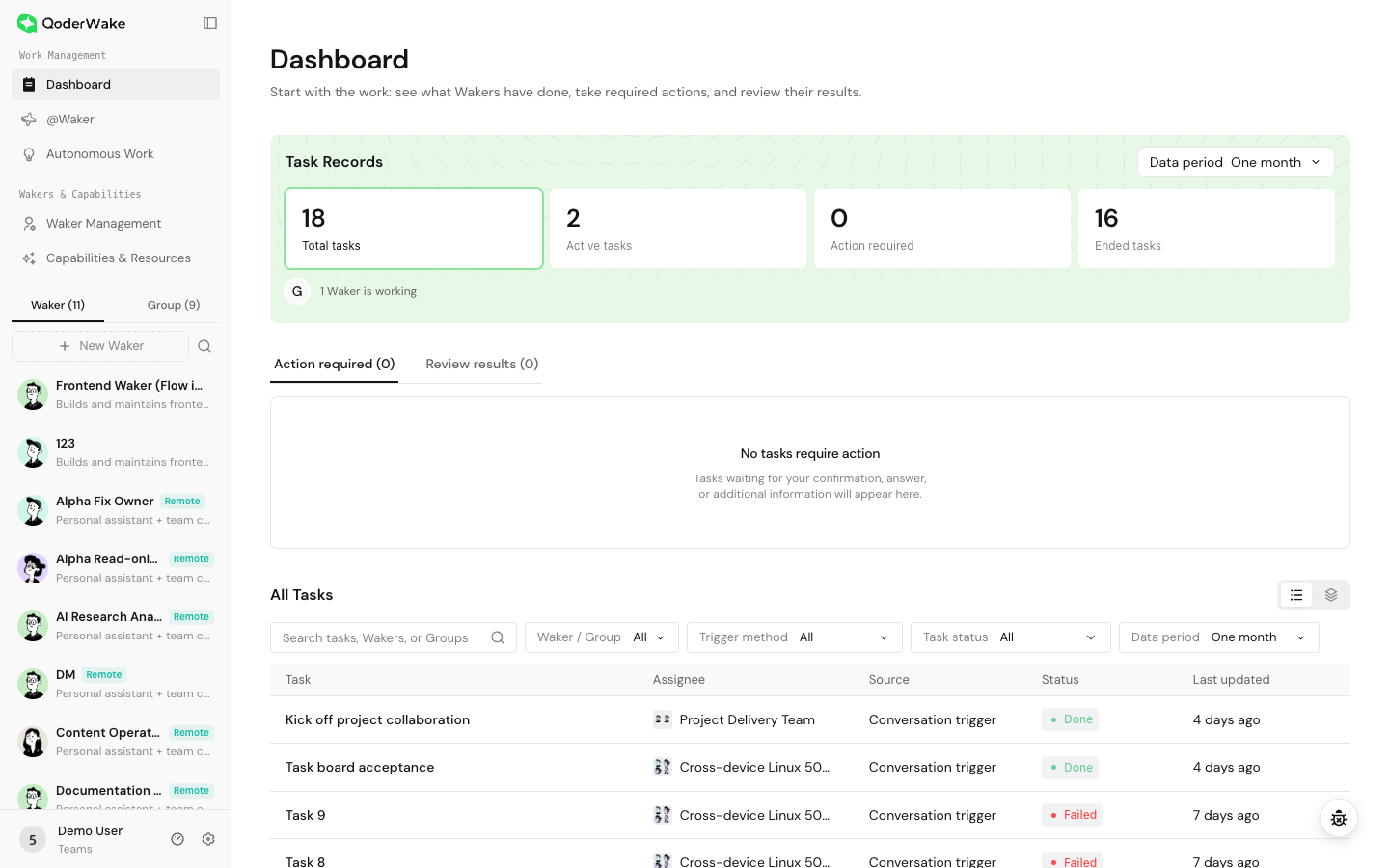 The global Task Board has three working areas:
Use list view for precise lookup and update-time comparison. Use lane view to inspect task flow by state. Open a row for details, or use the assignee to verify the responsible Waker or Group.
The Waker Task Board narrows the same workflow to one Waker, which is useful for inspecting that role's load, failures, and recent deliverables.
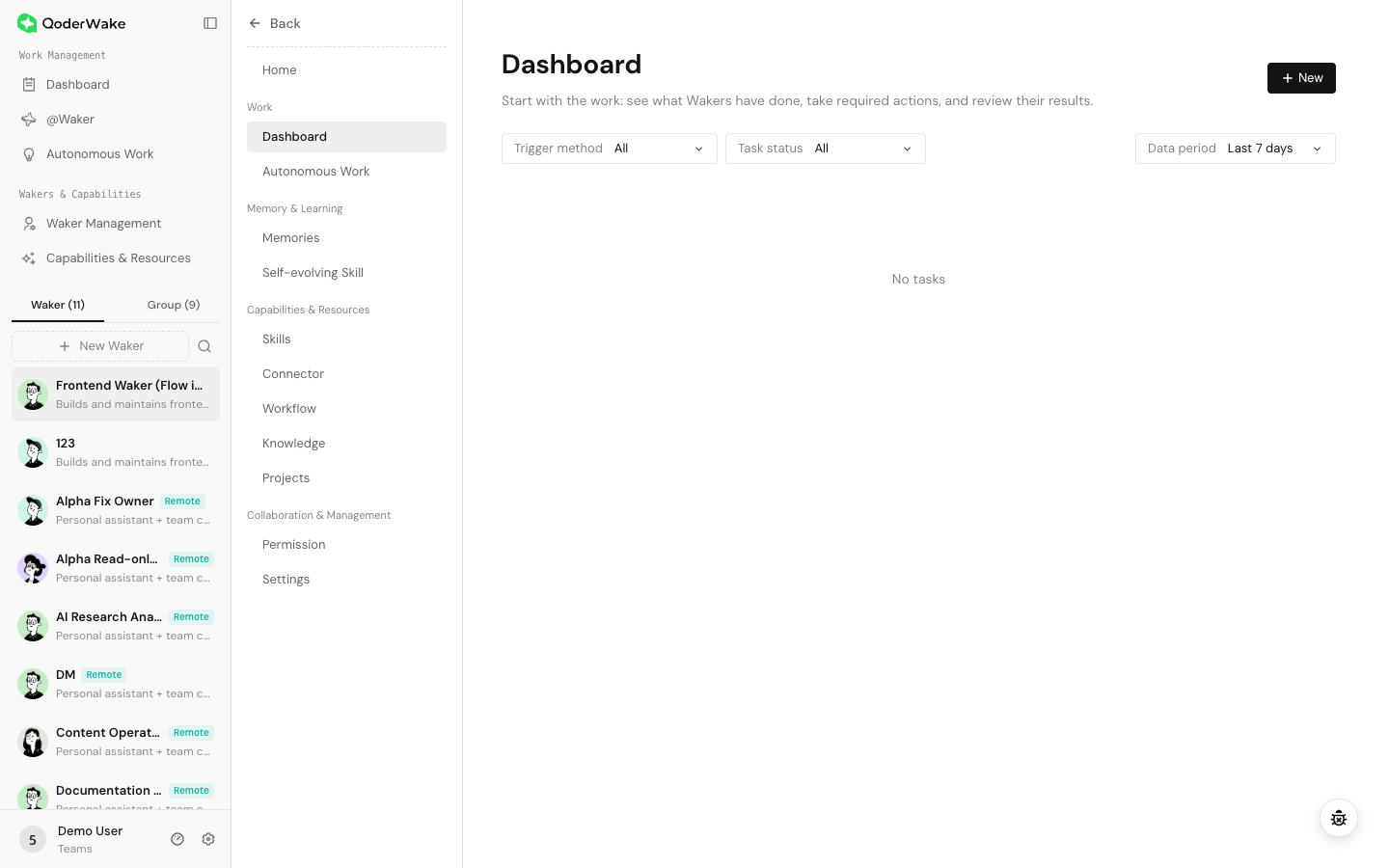 Both views show the task title, assignee, source, state, latest update, and a detail entry point. The global board additionally provides cross-Waker and cross-Group summaries and filters.
Completed is not the same as accepted. Verify files, links, external objects, tests, and key conclusions.
Check:
Path: left navigation → Dashboard → Approval Workbench. Task Tracking helps you notice blocked work; the Approval Workbench collects every item that needs an answer, choice, or confirmation.
Items can come from Group collaboration, a single-Waker chat, or WakerFlow. Common types include plan confirmation, clarification, plan changes, cancellation confirmation, and workflow questions. Filter by Status, Type, and Source; Source is useful when you only want items from one Waker, Group, or WakerFlow.
Do not retry repeatedly without diagnosis. Check:
The Task Board cannot force-edit a task state and does not replace complete business logs or artifact acceptance.
Open the global or Waker Task Board
- Global: left navigation → Task Board for account-wide work.
- Waker: Waker Management → select a Waker → Work → Task Board for that Waker only.
| Area | Purpose | When to use it |
|---|---|---|
| Task Records | Summarizes total, active, action-required, and ended tasks, and shows active Wakers or Groups | Review workload and spot unexpected changes |
| Needs attention | Collects tasks waiting for confirmation, more information, or result review | Handle first so work does not remain blocked on a human step |
| All Tasks | Filters all work by Waker / Group, trigger method, state, and time; supports list and lane views | Find work, identify an assignee, and review history |
Find a task
- Decide whether to search globally or under one Waker.
- Search by task title, Waker, or Group name.
- Narrow the list by assignee, trigger method, and task state.
- Expand the date range when an older task is missing.
- Confirm the target by title, assignee, source, state, and update time.
Understand states
| State | Meaning | Action |
|---|---|---|
| Queued | Waiting for scheduling or execution capacity | Wait briefly; investigate service or device if it persists |
| Running | A Waker or workflow is executing | Open details and inspect the latest progress |
| Action required | Waiting for input, authorization, or confirmation | Return to the source task and respond |
| Completed | This run ended | Inspect the reply and actual artifact |
| Failed | A step could not continue | Find the first error, fix it, and retry from the source |
| Canceled | Stopped by a user or the system | Inspect changes already made before restarting |
Open task details
Check:
- source and trigger time;
- executing Waker, Group, or WakerFlow;
- run input, workspace, and permission confirmation;
- current step, pending action, or first failure;
- final reply and artifact location.
Handle pending actions
- Open the item and return to the source chat or flow.
- Read the context, request, and impact.
- Supply missing information or approve/reject the operation.
- Confirm that execution resumes.
- Return to the board and verify the updated state.
Use the Approval Workbench
Path: left navigation → Dashboard → Approval Workbench. Task Tracking helps you notice blocked work; the Approval Workbench collects every item that needs an answer, choice, or confirmation.
Items can come from Group collaboration, a single-Waker chat, or WakerFlow. Common types include plan confirmation, clarification, plan changes, cancellation confirmation, and workflow questions. Filter by Status, Type, and Source; Source is useful when you only want items from one Waker, Group, or WakerFlow.
- Filter for Pending, then narrow by the source you are responsible for.
- Read the item, initiator, source task, and update time so that you do not act on an obsolete request.
- Select Handle to return to the source chat or workflow, where the complete context and controls are available.
- Answer, approve, or reject the request and confirm that execution continues as expected.
- Return to the Approval Workbench, verify that the item is Handled, and check the task's final status in Task Tracking.
Handle failures
Do not retry repeatedly without diagnosis. Check:
- complete inputs and accessible attachments;
- workspace, project, and execution device;
- Waker or WakerFlow availability;
- model, Skill, connector, and permission;
- external authorization, rate limits, and network.
Manage history
- Use names such as “project + task + stage/date” for searchability.
- Save required artifacts before deleting records.
- Deleting a task record does not reverse file or external-system changes.
- Prefer filters and naming conventions over deleting audit history for visual cleanliness.
Troubleshooting
| Symptom | Action |
|---|---|
| New task missing | Clear filters, expand date range, and check global/Waker scope |
| State differs from source | Trust the latest source record and refresh the board |
| Unread count remains | Open the item and view its newest message |
| Task runs indefinitely | Inspect the latest step, device, external service, and confirmations |
| Completed without artifact | Open source details and verify the output location |