

A non-technical operations person made good use of Qoder to build a personal iOS movie app in a single day.
Coming home from work one evening, I wanted to watch a movie. I opened one video app after another, and faced with the overwhelming lists of recommendations, I actually had no idea what to watch. After scrolling on the couch for twenty minutes, I ended up watching nothing and just went to sleep.
I do operations on the Qoder team, and I can't code. But I had an idea: could I make an app that just recommends a few movies to me every day, so I can swipe through and decide what to watch tonight? Swipe away what I don't like, save what I do. No "recommended for you" algorithms, no community—just five movies a day, deciding by the posters.
Inspired by my colleagues, after lunch one day I decided to stop just thinking about it. I opened Qoder and dove right in.
What happened next surprised me. I did actually build it—an iOS app called "Daily Movie" that runs on an iPhone with a pretty decent experience. But the process was far from as smooth as I'd imagined: environment setup cost me two hours, the share feature caused the app to crash outright, and the UI, once built, obviously "looked AI-made." Later, scrolling through social media, I saw a popular analogy: thinking Vibe Coding will make you money is like buying a coffee machine and assuming you can open a café. I found it quite apt. Letting AI work purely on vibes can get you started, but it won't take you far. What eventually filled in the gaps for me was describing my requirements more clearly, and loading professional standards onto the Agent (both Qoder and the industry call these Skills—more on that later).
I opened Qoder and selected Quest mode from the top-left corner.
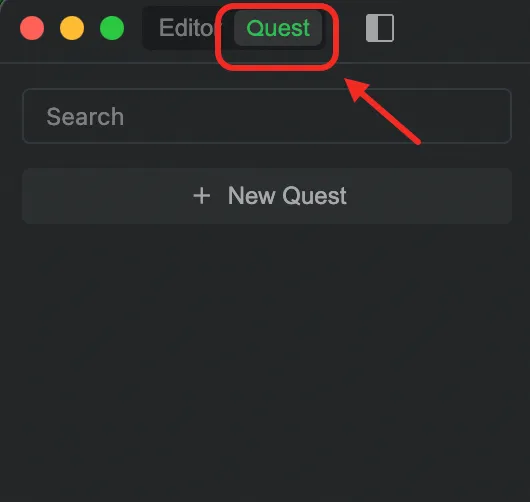 Once inside, there are three templates to choose from:
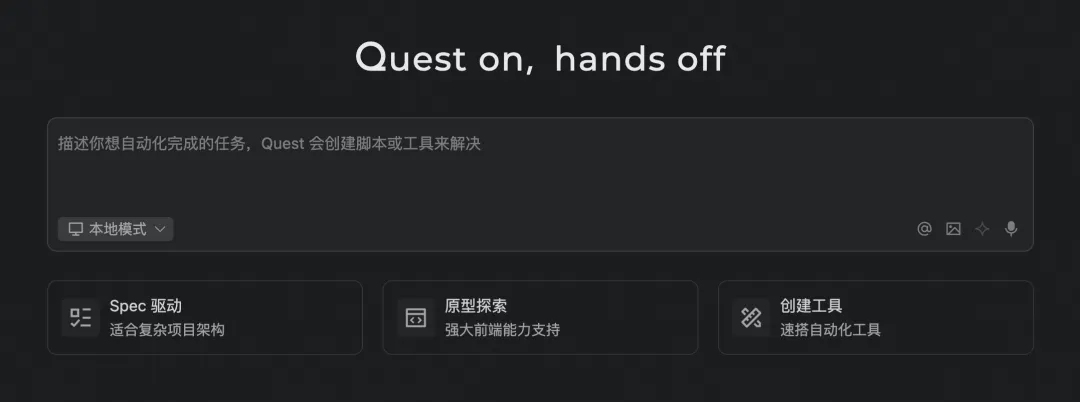 What I wanted to build was an app prototype, so I chose Prototype Demos.
The way these three templates are divided is worth mentioning. Prototype Demos suits "I have an idea, let's get it running and see"—essentially structured Vibe Coding: you describe a vague goal, and the Agent helps you explore quickly. Code with Spec takes another path: first write clearly what you want and what the acceptance criteria are, then the Agent executes according to the Spec. One goes from vague to clear; the other from clear to done. As I'll get to later, I started with Prototype Demos this time, but what really kept the project from spinning out of control was exactly the "Spec-style thinking" I gradually learned along the way.
There's an easy pitfall when collaborating with an Agent: the more you try to control every step, the more easily it goes astray. A better approach is to describe the destination, not dictate the route. A developer on my team put it well: clarify the intent, and the Spec will grow out naturally. So instead of saying "first create a React Native project, then configure the navigation routes...", I poured out the whole concept of "Daily Movie" and the features I wanted all at once: recommend 5 movies a day, support swiping up and down, allow saving favorites, and give it a cinema feel. The more specific the intent, the higher the completeness of the Agent's first version. Qoder Quest 1.0 responded quickly and gave me two options: one to run inside QStudio, and another to generate a standalone React Native project. Without much hesitation, I chose the second.
What I wanted to build was an app prototype, so I chose Prototype Demos.
The way these three templates are divided is worth mentioning. Prototype Demos suits "I have an idea, let's get it running and see"—essentially structured Vibe Coding: you describe a vague goal, and the Agent helps you explore quickly. Code with Spec takes another path: first write clearly what you want and what the acceptance criteria are, then the Agent executes according to the Spec. One goes from vague to clear; the other from clear to done. As I'll get to later, I started with Prototype Demos this time, but what really kept the project from spinning out of control was exactly the "Spec-style thinking" I gradually learned along the way.
There's an easy pitfall when collaborating with an Agent: the more you try to control every step, the more easily it goes astray. A better approach is to describe the destination, not dictate the route. A developer on my team put it well: clarify the intent, and the Spec will grow out naturally. So instead of saying "first create a React Native project, then configure the navigation routes...", I poured out the whole concept of "Daily Movie" and the features I wanted all at once: recommend 5 movies a day, support swiping up and down, allow saving favorites, and give it a cinema feel. The more specific the intent, the higher the completeness of the Agent's first version. Qoder Quest 1.0 responded quickly and gave me two options: one to run inside QStudio, and another to generate a standalone React Native project. Without much hesitation, I chose the second.
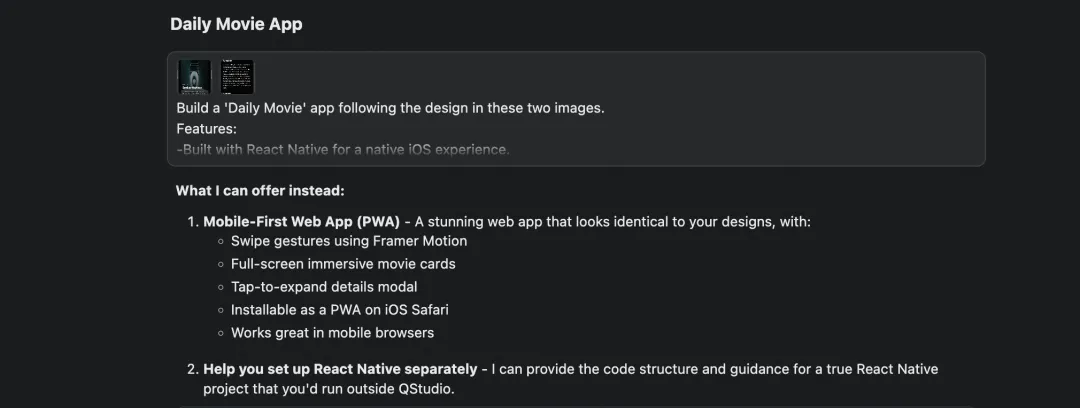 Before long, Quest had scaffolded the app prototype and told me where the project was located.
Then came the problem: how do I set up the runtime environment?
I grilled Quest with question after question. This step took about two hours, mainly getting stuck in two places: first, the wrong Node.js version meant dependencies wouldn't install; second, the iOS simulator needed to be downloaded separately, and the operations in Xcode were complete gibberish to me. At one point I stared at Xcode's enormous interface—full of buttons and menus I didn't recognize—and really wanted to just shut down the computer. Luckily, every time I hit an error I just screenshotted it and threw it at Qoder, and it could always help me pinpoint the cause and give a solution.
Ironically, the "writing code" part was something Qoder handled in minutes; what really gave me trouble was everything outside the code: how to install the iOS simulator, those cryptic options in Xcode, and so on. The Agent can help you write code, but for these environment and tooling problems, Quest can only give you suggestions—the final call is still up to you.
In the end, I successfully launched "Daily Movie" on the iOS simulator using Expo Go.
Before long, Quest had scaffolded the app prototype and told me where the project was located.
Then came the problem: how do I set up the runtime environment?
I grilled Quest with question after question. This step took about two hours, mainly getting stuck in two places: first, the wrong Node.js version meant dependencies wouldn't install; second, the iOS simulator needed to be downloaded separately, and the operations in Xcode were complete gibberish to me. At one point I stared at Xcode's enormous interface—full of buttons and menus I didn't recognize—and really wanted to just shut down the computer. Luckily, every time I hit an error I just screenshotted it and threw it at Qoder, and it could always help me pinpoint the cause and give a solution.
Ironically, the "writing code" part was something Qoder handled in minutes; what really gave me trouble was everything outside the code: how to install the iOS simulator, those cryptic options in Xcode, and so on. The Agent can help you write code, but for these environment and tooling problems, Quest can only give you suggestions—the final call is still up to you.
In the end, I successfully launched "Daily Movie" on the iOS simulator using Expo Go.
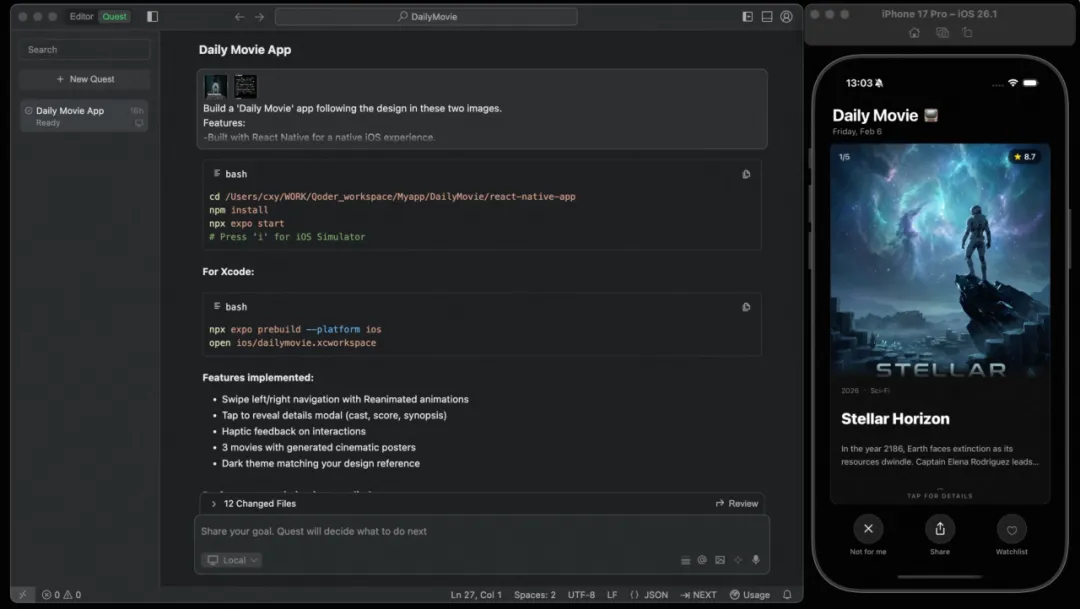 When the app ran for the first time, I froze for a few seconds, then took a screenshot and sent it to the work group chat. A colleague replied, "You made this?" and I said, "Strictly speaking, Quest made it, but the idea was mine." Even though it was still using mock data, both the main screen and the detail page were there, and the overall framework already looked the part.
Fake data is ultimately fake; it had to be swapped for real movie information. But where would the data come from?
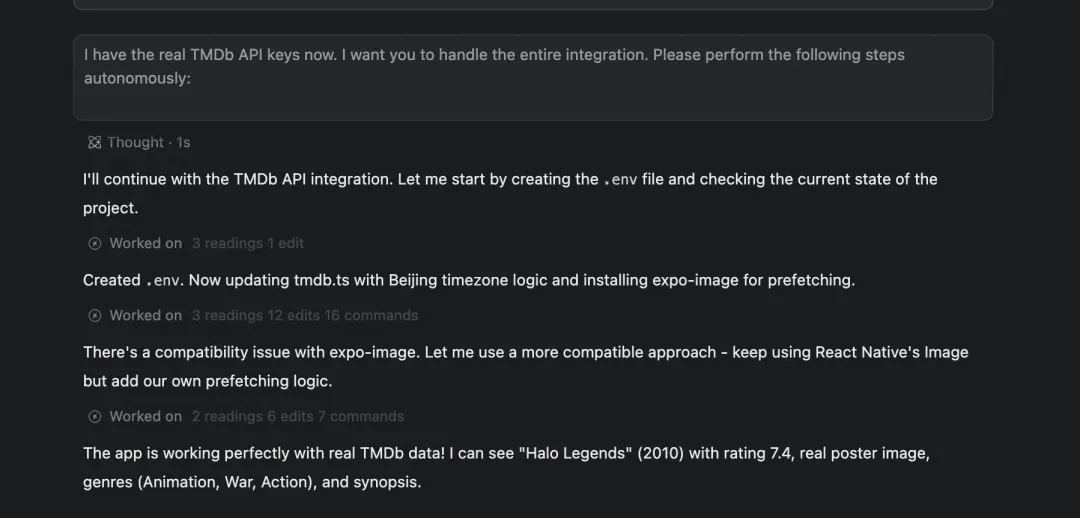
I asked Qoder to recommend a suitable data source, and it suggested TMDb (The Movie Database), which offers a free movie data API. You can get information on millions of movies worldwide, it's usable right after registration, and it's perfect for personal projects. I followed the process to register an account, applied for developer access, and after getting the API Key I told Qoder to do the integration—and got the real data quite smoothly.
Opening the app and seeing real movie posters load one after another, it instantly felt "alive."
With the data in place, the next step was designing the UI.
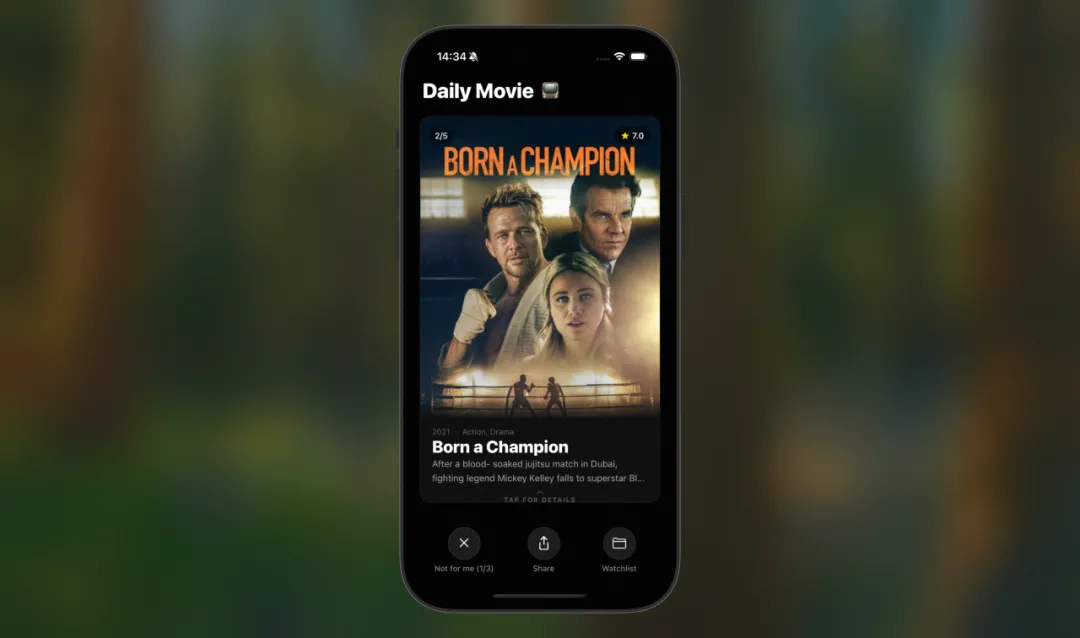
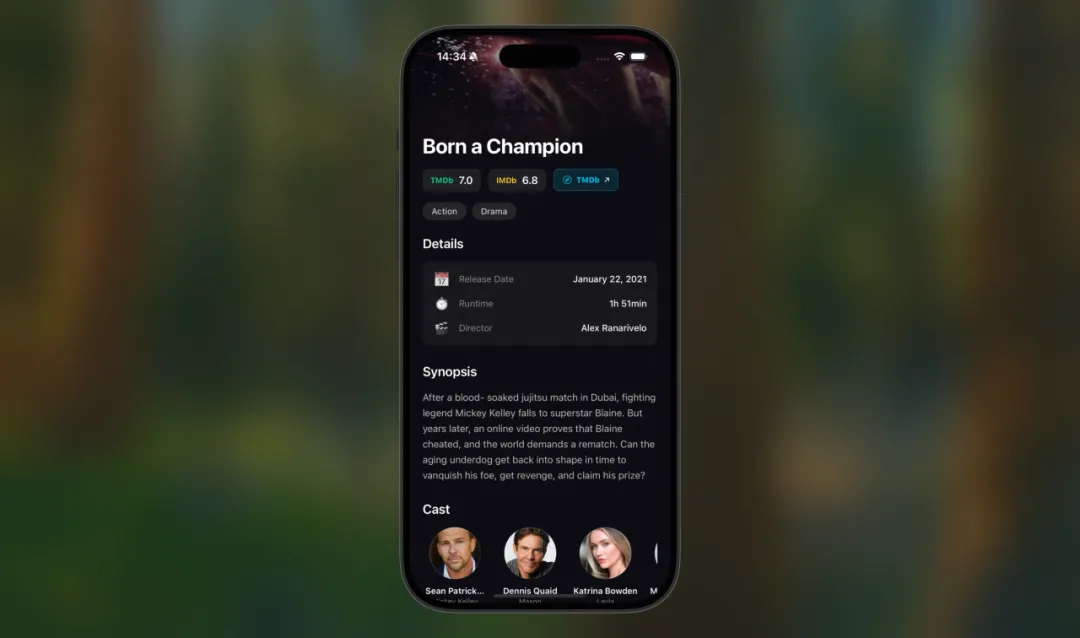
I told Qoder I wanted that dark-cinema feel: the movie cards should be big, with the poster as the star. Because the core of this app is deciding by the poster, if you can't see the poster clearly the whole experience falls apart. After tapping a card, you should see the full movie info—rating, director, cast, and synopsis—plus a favorite button and a link to the TMDb web page.
For the UI design, I went through three or four rounds of adjustments:
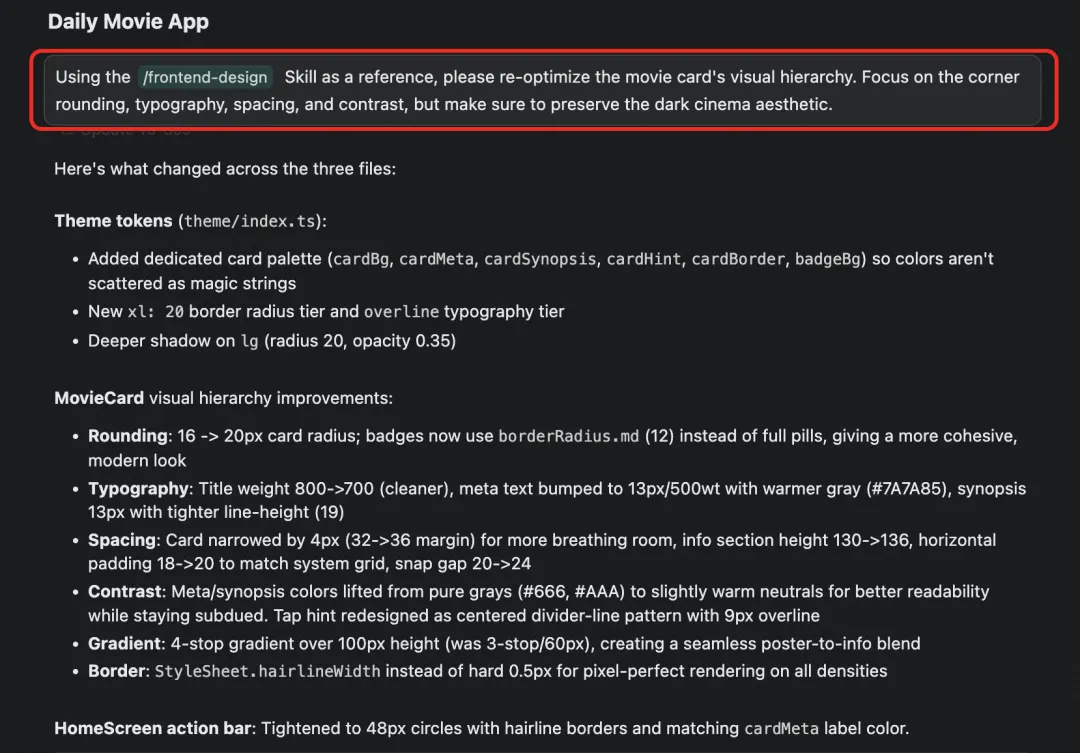 The difference was quite obvious. The earlier UI was like "usable," while the UI after adding the Skill was like "wanting to use it." The cards' rounded corners, font hierarchy, and spacing rhythm all felt more comfortable—no longer that cookie-cutter AI aesthetic.
Just like that, Quest handled the scaffolding and implementation, Skills handled quality control, and the final result genuinely surprised me.
The difference was quite obvious. The earlier UI was like "usable," while the UI after adding the Skill was like "wanting to use it." The cards' rounded corners, font hierarchy, and spacing rhythm all felt more comfortable—no longer that cookie-cutter AI aesthetic.
Just like that, Quest handled the scaffolding and implementation, Skills handled quality control, and the final result genuinely surprised me.
The requirement for this feature was straightforward: "I want to save movies I like into a favorites list, and still see them the next time I open the app. Favorites is a separate page that displays all the movies I've saved."
Quest used something called AsyncStorage, which you can simply think of as a "little warehouse" on the phone's local storage. The favorited movie data is stored in this warehouse; close the app and reopen it and it's still there, viewable without an internet connection. This feature went smoothly, with no pitfalls.
This step hit a big pitfall. Initially I told Qoder: "I want to make a beautiful image share card with the movie poster and a QR code, so users can save the image and share it." Qoder quickly implemented a solution for me: use react-native-view-shot to take a screenshot, and expo-sharing to share.
But once installed, the app crashed outright. It was the kind of crash where you tap once, the screen goes black, and you're bounced back to the home screen—clean and decisive, no struggle at all.
I threw the error message at Qoder, and after analyzing it, it told me: the native modules these features depend on can't run in the Expo Go environment; you need to build a standalone version of the app. And building a standalone version meant dealing with an Apple Developer account, signing certificates, and the like—too complicated for me.
I wasn't ready to give up, so I tried two or three alternative approaches, each with its own problems. After going back and forth for over two hours, I was honestly quite frustrated, because the share card was a feature I'd especially wanted from the start. But in the end I accepted it and simplified the plan: switch to plain text content plus React Native's native share component.
The final share content looked like this:
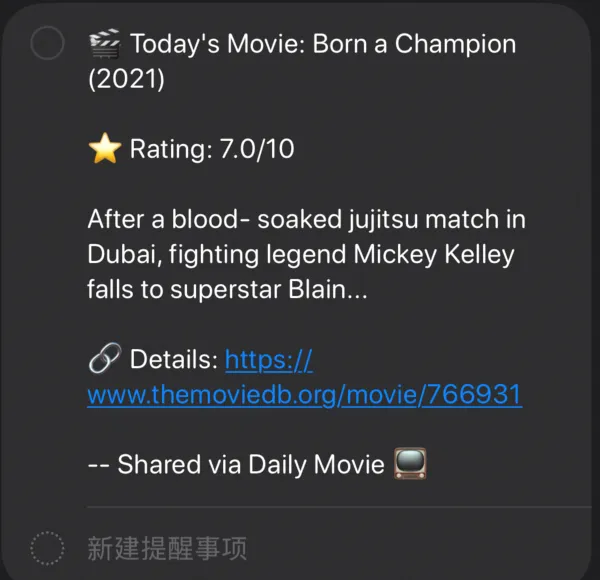 No fancy card, but usable and stable.
The biggest lesson this taught me: build a running version first, and keep iterating on the complex stuff later.
AI is indeed efficient on the "standard path," but when it hits platform boundaries (Expo Go's native module limits, Apple Developer's certificate system, etc.), it can only tell you where the problem is—it can't decide for you what to do. What finally pulled me out of the pit was one word: cut. I cut the image share card and switched to plain text, saving the time to polish the features that really mattered. Honestly, I was reluctant when cutting it, but looking back the decision was right—otherwise I'd have been stuck there.
No fancy card, but usable and stable.
The biggest lesson this taught me: build a running version first, and keep iterating on the complex stuff later.
AI is indeed efficient on the "standard path," but when it hits platform boundaries (Expo Go's native module limits, Apple Developer's certificate system, etc.), it can only tell you where the problem is—it can't decide for you what to do. What finally pulled me out of the pit was one word: cut. I cut the image share card and switched to plain text, saving the time to polish the features that really mattered. Honestly, I was reluctant when cutting it, but looking back the decision was right—otherwise I'd have been stuck there.
After the basic features were done, I spent more time polishing details with Quest:
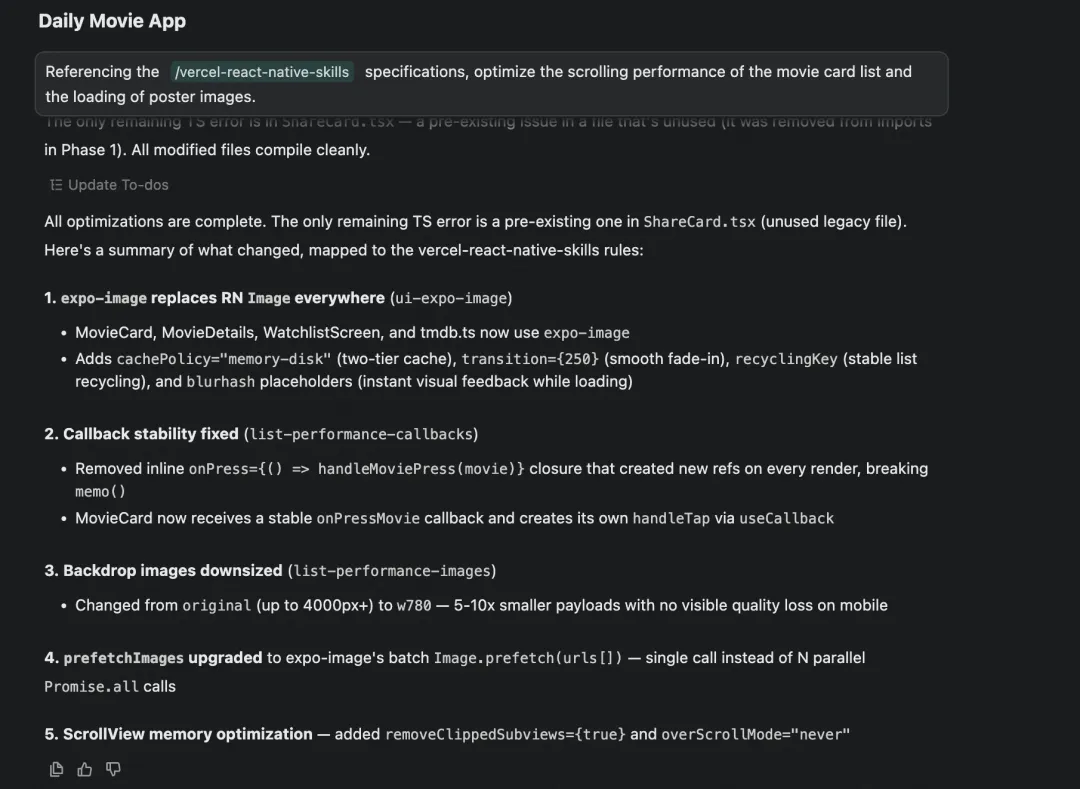 Following the rules in this Skill, Quest made a whole set of optimizations: poster images switched to a more efficient loading method, so when you open the app it first shows a blurred color block and then smoothly transitions to the high-definition image, with no white-screen flicker; the large background images were intelligently compressed, shrinking to a fraction of the size while looking no different in quality on the phone; and the underlying logic of the scrolling list was cleaned up, so content scrolled past automatically releases memory, and it won't get laggier the more you scroll. I have no idea how any of this works under the hood, but the results are real—after the optimization, swiping on a real device was noticeably smoother than before, and poster images appeared almost instantly.
On social media, I found many people discussing similar things. Some say Vibe Coding will soon hit a wall—once a project gets big it starts to "drift," and the Agent, changing things bit by bit, can't even clearly say what it changed. Others say only SDD (Spec-Driven Development) is the GOAT: write the requirements and architecture docs clearly first, then let the Agent get to work. Looking back, isn't that exactly my journey? At first, letting AI work purely on vibes was indeed fast, but I got stuck on things like environment setup, platform limits, and design quality. Later I gradually learned to describe requirements more specifically and then loaded Skills onto the Agent, and only then did the results come through.
There's also a particularly funny one: the product manager says with AI you don't have to wait for the designer's mockups; the designer says with AI you don't have to wait for the developer to write code; the developer says with AI you don't have to wait for the PM to write requirements. After reading that I thought: so as an operations person, have I just bypassed all three of them? After all, users having needs and feedback is eternal.
Another line that resonated with me: "If the Agent can write code, it can also update the plan. Just let it do it." Skills go a step further—the Agent doesn't have to guess what a good SOP is; it just reads the standard and follows it.
I now lean toward thinking that Vibe Coding is a great starting point, but it can't carry you the whole way on its own. If I had started with Code with Spec back then—spending 10 minutes to write the requirements and acceptance criteria clearly—I probably wouldn't have hit that share-feature pitfall at all. Of course, without that initial "let me just try it" impulse, I might still be just thinking about it. So you need both; it's just a matter of order and proportion.
Karpathy says future software will become highly personalized: everyone will have AI generate an app on the spot for their own needs, use it and toss it, without downloading someone else's generic product from the App Store. He calls this "bespoke software," and made an analogy: today's software is like a castle built from bricks, while future software is more like a pot of boiling soup—code cooked up as needed, and gone once you've drunk it.
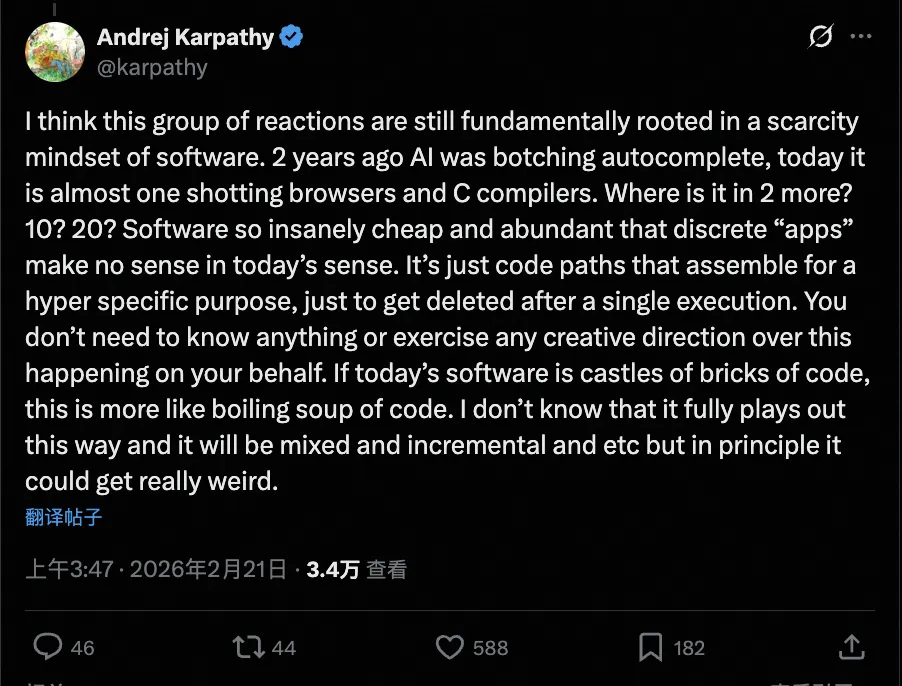 The moment I saw it, I thought: isn't this describing "Daily Movie"? Five movies a day, swipe up and down, decide by the poster—this kind of need is so specific that no one in the App Store would ever build one that perfectly fits my taste. But I built it in a single day, and even though it's just for myself, the experience suits me far better than those "big and comprehensive" movie apps.
That said, looking back after finishing, there's something rather ironic: what took me the most time wasn't "building" it, but "turning it into an iOS app." Qoder wrote the code quickly, and the rest of the time was all spent wrestling with the iOS ecosystem: Xcode, the simulator, Expo Go's native module limits, Apple Developer certificates. It's 2026, and 99% of services still don't have AI-friendly interfaces—users still have to operate web pages by hand. "What am I, a computer?" I deeply relate; that's exactly how I felt staring at Xcode.
If, as Karpathy says, future software doesn't need to be an app, doesn't need the App Store, doesn't need signing certificates, and code is generated on demand and gone after use—then half the pitfalls in this article simply wouldn't exist. But we're not there yet; we're stuck in a transition period: AI's ability to write code has arrived, but the infrastructure to actually run that code is still the old way. Still, for people with specific needs who are willing to tinker, the barrier really is much lower than before—and it's dropping fast.
The moment I saw it, I thought: isn't this describing "Daily Movie"? Five movies a day, swipe up and down, decide by the poster—this kind of need is so specific that no one in the App Store would ever build one that perfectly fits my taste. But I built it in a single day, and even though it's just for myself, the experience suits me far better than those "big and comprehensive" movie apps.
That said, looking back after finishing, there's something rather ironic: what took me the most time wasn't "building" it, but "turning it into an iOS app." Qoder wrote the code quickly, and the rest of the time was all spent wrestling with the iOS ecosystem: Xcode, the simulator, Expo Go's native module limits, Apple Developer certificates. It's 2026, and 99% of services still don't have AI-friendly interfaces—users still have to operate web pages by hand. "What am I, a computer?" I deeply relate; that's exactly how I felt staring at Xcode.
If, as Karpathy says, future software doesn't need to be an app, doesn't need the App Store, doesn't need signing certificates, and code is generated on demand and gone after use—then half the pitfalls in this article simply wouldn't exist. But we're not there yet; we're stuck in a transition period: AI's ability to write code has arrived, but the infrastructure to actually run that code is still the old way. Still, for people with specific needs who are willing to tinker, the barrier really is much lower than before—and it's dropping fast.
At this point, the development of "Daily Movie" reached a milestone. I installed Expo Go on a real iPhone, scanned the code to run it, and the overall experience was much better than I'd expected—smooth swiping, silky interactions.
To sum up the experience of the final version of the app:
From opening Qoder to building an app that runs smoothly on an iPhone, I didn't write a single line of code the whole way.
One thing surprised me throughout the process: I didn't feel that "being dragged along by the AI" anxiety. Thinking about it, it probably has to do with Quest mode's rhythm—it first asks what you want to build, pops up question cards to let you quickly clarify intent when things are unclear, and only executes autonomously after confirmation.
Looking back, Qoder Quest helped me turn an idea into running code, while Skills backstopped the design and performance areas I know nothing about. Without Skills, the app would most likely still be at the level you can tell at a glance was "AI-made."
I hit quite a few pitfalls along the way: environment setup took two hours, and in the end I had to cut a requirement for the share feature. But every time I hit a wall, the reasons looking back were about the same: either I hadn't thought clearly about what I actually wanted, or I underestimated the constraints of reality. The solutions weren't fancy either—just stop, think it through again, and then let the Agent get to work.
"Daily Movie" isn't perfect, but I built it (okay, Quest built it, but the idea was mine). The biggest takeaway after finishing wasn't "turns out I can do it too," but the discovery that when it comes to collaborating with an Agent, whether you can code really doesn't matter that much. What matters is whether you can clearly articulate what you want.
If you also have an app you've long wanted to build, don't wait until you're "ready." Open Qoder, switch to Quest mode, say your idea out loud, and start from a running version. You'll definitely hit walls along the way; when you do, stop and think: what do I actually want, and what can I do without for now.
A non-technical operations person built an app tailored exactly to their own taste. Come to think of it, that's pretty interesting.
From Idea to a Running App
01. Building the App Framework with Quest Mode
I opened Qoder and selected Quest mode from the top-left corner.
- Spec-Driven (Code with Spec): suited for development tasks with clear requirements and a defined plan
- Prototype Demos: suited for quickly turning an idea into a previewable prototype
- Create Tools: suited for building tool-type applications
02. Connecting Real Movie Data
Fake data is ultimately fake; it had to be swapped for real movie information. But where would the data come from?
I asked Qoder to recommend a suitable data source, and it suggested TMDb (The Movie Database), which offers a free movie data API. You can get information on millions of movies worldwide, it's usable right after registration, and it's perfect for personal projects. I followed the process to register an account, applied for developer access, and after getting the API Key I told Qoder to do the integration—and got the real data quite smoothly.
Opening the app and seeing real movie posters load one after another, it instantly felt "alive."
03. Killing the "AI Flavor" with Skills
With the data in place, the next step was designing the UI.
I told Qoder I wanted that dark-cinema feel: the movie cards should be big, with the poster as the star. Because the core of this app is deciding by the poster, if you can't see the poster clearly the whole experience falls apart. After tapping a card, you should see the full movie info—rating, director, cast, and synopsis—plus a favorite button and a link to the TMDb web page.
For the UI design, I went through three or four rounds of adjustments:
- The first version's cards were too small and the posters unclear → "Make the cards taller, taking up 2/3 of the screen height"
- The rating numbers were too small → "Make the rating numbers one size bigger and bold"
- The transition between the bottom text and the poster was too abrupt → "Add a gradient at the bottom of the poster, from transparent to black"
frontend-design, then had Qoder re-optimize the UI according to the design standards inside it.
Here's a small tip worth sharing: after installing a Skill, write your instructions specifically.
The Skill gives the AI concrete design standards; the more precise your instructions, the more reliable the output.
But honestly, at the time I didn't think that much—I just felt: after installing the Skill, the results were so much better. What makes a Skill different from an ordinary document is that it isn't written once and then left to gather dust; it's a "living standard" the AI reads every time it works. It takes effect each time it's used, and there's no problem of it becoming outdated.
04. The Favorites Feature
The requirement for this feature was straightforward: "I want to save movies I like into a favorites list, and still see them the next time I open the app. Favorites is a separate page that displays all the movies I've saved."
Quest used something called AsyncStorage, which you can simply think of as a "little warehouse" on the phone's local storage. The favorited movie data is stored in this warehouse; close the app and reopen it and it's still there, viewable without an internet connection. This feature went smoothly, with no pitfalls.
05. Pitfalls in the Share Feature
This step hit a big pitfall. Initially I told Qoder: "I want to make a beautiful image share card with the movie poster and a QR code, so users can save the image and share it." Qoder quickly implemented a solution for me: use react-native-view-shot to take a screenshot, and expo-sharing to share.
But once installed, the app crashed outright. It was the kind of crash where you tap once, the screen goes black, and you're bounced back to the home screen—clean and decisive, no struggle at all.
I threw the error message at Qoder, and after analyzing it, it told me: the native modules these features depend on can't run in the Expo Go environment; you need to build a standalone version of the app. And building a standalone version meant dealing with an Apple Developer account, signing certificates, and the like—too complicated for me.
I wasn't ready to give up, so I tried two or three alternative approaches, each with its own problems. After going back and forth for over two hours, I was honestly quite frustrated, because the share card was a feature I'd especially wanted from the start. But in the end I accepted it and simplified the plan: switch to plain text content plus React Native's native share component.
The final share content looked like this:
06. Detail Polishing and Performance Optimization
After the basic features were done, I spent more time polishing details with Quest:
- The "Not Interested" button: Don't want to watch one of the 5 movies recommended today? Tap "Not for me" to swap in another. But you can only swap 3 times a day; once you're out, it prompts "Come back tomorrow." This design is intentional—if you could swap infinitely, the recommendations would turn into a random shuffle player, and the ritual feel of a "daily selection" would be gone. Also, appropriately limiting options actually helps you decide faster. Against decision paralysis, sometimes less is more.
- Daily refresh logic: The five movies refresh based on UTC+8—that is, they update at midnight Beijing time. I discovered this bug through my own use: opening it at 1 a.m. still showed yesterday's lineup, and I thought the algorithm was broken. It took a while to troubleshoot before I realized it was a time zone issue. My operations instincts finally came in handy.
- Haptic feedback: When swiping to switch, tapping buttons, or favoriting a movie, the phone gives a slight vibration feedback. After adding this, the experience improved noticeably, and the tactile feel came close to a native iPhone app.
frontend-design, so I searched through Skills and found one called vercel-react-native-skills—a collection of React Native and Expo best practices from the Vercel team, dedicated to solving mobile performance issues.
After installing it, I told Qoder: "Referencing the vercel-react-native-skills standards, optimize the swiping performance of the movie card list and the poster image loading."
frontend-design made the UI no longer look like an AI template, and vercel-react-native-skills made the swiping and loading keep up with the speed of your hand. With the two Skills working together, the app's quality genuinely leveled up.
07. Some Thoughts After Finishing
On social media, I found many people discussing similar things. Some say Vibe Coding will soon hit a wall—once a project gets big it starts to "drift," and the Agent, changing things bit by bit, can't even clearly say what it changed. Others say only SDD (Spec-Driven Development) is the GOAT: write the requirements and architecture docs clearly first, then let the Agent get to work. Looking back, isn't that exactly my journey? At first, letting AI work purely on vibes was indeed fast, but I got stuck on things like environment setup, platform limits, and design quality. Later I gradually learned to describe requirements more specifically and then loaded Skills onto the Agent, and only then did the results come through.
There's also a particularly funny one: the product manager says with AI you don't have to wait for the designer's mockups; the designer says with AI you don't have to wait for the developer to write code; the developer says with AI you don't have to wait for the PM to write requirements. After reading that I thought: so as an operations person, have I just bypassed all three of them? After all, users having needs and feedback is eternal.
Another line that resonated with me: "If the Agent can write code, it can also update the plan. Just let it do it." Skills go a step further—the Agent doesn't have to guess what a good SOP is; it just reads the standard and follows it.
I now lean toward thinking that Vibe Coding is a great starting point, but it can't carry you the whole way on its own. If I had started with Code with Spec back then—spending 10 minutes to write the requirements and acceptance criteria clearly—I probably wouldn't have hit that share-feature pitfall at all. Of course, without that initial "let me just try it" impulse, I might still be just thinking about it. So you need both; it's just a matter of order and proportion.
Karpathy says future software will become highly personalized: everyone will have AI generate an app on the spot for their own needs, use it and toss it, without downloading someone else's generic product from the App Store. He calls this "bespoke software," and made an analogy: today's software is like a castle built from bricks, while future software is more like a pot of boiling soup—code cooked up as needed, and gone once you've drunk it.
08. The Final Result
At this point, the development of "Daily Movie" reached a milestone. I installed Expo Go on a real iPhone, scanned the code to run it, and the overall experience was much better than I'd expected—smooth swiping, silky interactions.
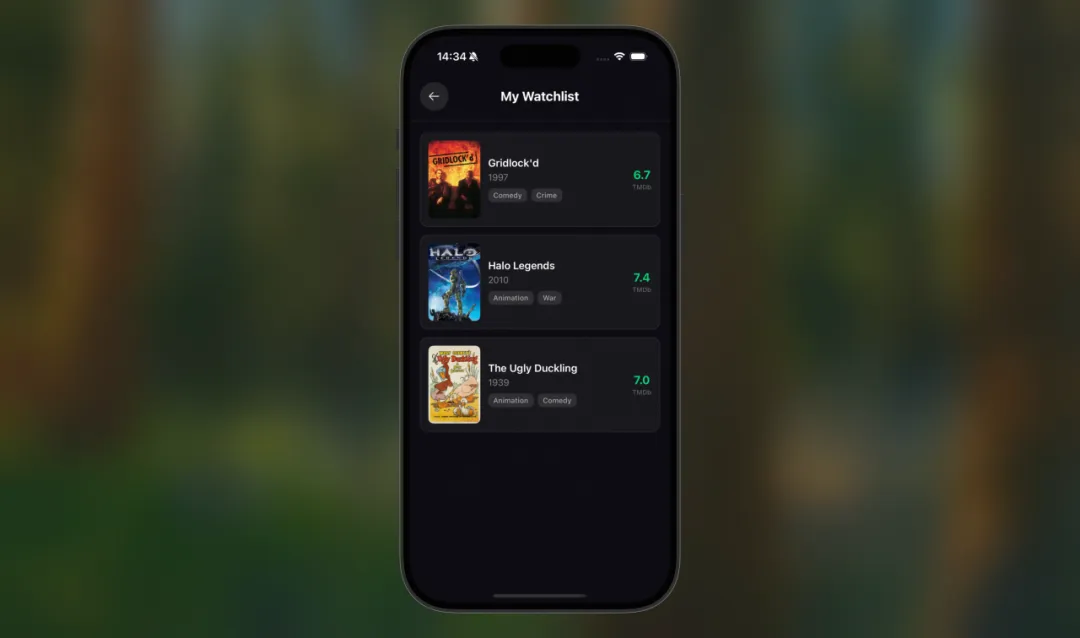
To sum up the experience of the final version of the app:
- Ready to use right away, no registration or login needed
- 5 hand-picked TMDb-rated (6+) movies a day, browsed by swiping up and down
- Tap to view details, favorite and share in one tap
- Enhanced with haptic feedback, with a tactile feel close to native
09. A Few Tips for Friends Who Want to Build Apps with AI
- Pick the right template first: If you want to validate an idea or make a presentable demo, choose Prototype Demos; if you have clear feature requirements and a technical plan, choose Code with Spec.
- Describe the destination, not the route: "Make a movie recommendation app" is far worse than "Make an iOS app that recommends 5 movies a day, supports swiping up and down to browse, and allows favoriting." Say clearly "what you want" and let the AI decide "how to do it"—the first version's completeness will be much higher.
- Don't panic when you hit errors: Screenshot or copy the error message and send it straight to Qoder; it can pinpoint most environment setup issues.
-
Install a few Skills: If you're building front-end pages, install
frontend-design; if you're doing a content-type project, installseo-content. The difference before and after installing is visible to the naked eye—the earlier you install, the sooner you benefit. Head to skills.sh to see what suits you. - Start with Vibe, finish with Spec: It's fine to use Prototype Demos for quickly validating an idea. But if what you're building is more than a demo, seriously consider starting with Code with Spec. Spending 10 minutes writing the requirements clearly (what features you want, what you don't, and what the acceptance criteria are) is far more worthwhile than spending two hours in pitfalls later. The clearer the intent, the lower the chance the AI goes astray.