

Details on Enterprise plans pricing, seat management, and shared add-on credits.
The Enterprise plans are designed for businesses and teams, providing centralized management, collaboration, and security capabilities, including:
The Enterprise plans are priced per seat, with support for purchasing Shared Add-on Credits for organization-wide consumption.
When a user in the organization is assigned a billable role, they occupy a seat. Once occupied, the seat is billed for the current billing cycle. If the user is later removed from the organization, any seat charges already incurred are non-refundable. For details about adding and removing members, see Members and Roles.
 When adding a new seat, charges are applied on a prorated basis for the remainder of the current billing cycle. For Teams plans, the included 3,000 Credits for the new seat are also prorated accordingly.
Administrators can purchase Shared Add-on Credits to supplement model compute capacity. These credits form a shared pool available to all organization members.
For complete details, see the Shared Add-on Credits guide.
Enterprise plans support centralized billing.
For organizations that purchased on the official website:
- Centralized billing: Organization billing is managed and paid centrally by admins, with support for limiting resource usage quotas.
- Admin console: Manage member access permissions, model usage restrictions, data privacy modes, and more.
- Domain control: Restrict access to specific email domains.
- Single Sign-On (SSO): Support for enterprise-grade authentication.
- Analytics & Insights: Data metrics and analysis.
- Capability management and distribution: Plugin/Skill management and sharing.
- Knowledge engine: Maximize team knowledge value.
Plan Comparison
| Capability | Teams | Enterprise | |
|---|---|---|---|
| Supported products | Qoder IDE | ✓ | ✓ |
| QoderWork | ✓ | ✓ | |
| QoderWake | ✓ | ✓ | |
| Qoder JetBrains Plugin | ✓ | ✓ | |
| Qoder CLI | ✓ | ✓ | |
| Cloud Agents | ✓ | ✓ | |
| Qoder Mobile | ✓ | ✓ | |
| Identity & access | SSO (SAML/OIDC) | ✓ | ✓ |
| Role management | ✓ | ✓ | |
| Groups | ✓ | ||
| Centralized billing | Resource quota management | ✓ | ✓ |
| Shared Add-on Credits pooling | ✓ | ✓ | |
| Group-based billing | ✓ | ||
| Knowledge engine | RepoWiki / Knowledge Cards | ✓ | ✓ |
| Personal knowledge base cloud storage | ✓ | ✓ | |
| AI extensibility | Plugin/Skill sharing | ✓ | ✓ |
| Plugin/Skill centralized distribution | ✓ | ||
| Plugin Marketplace | ✓ | ||
| AI governance | Model routing policy control | ✓ | |
| Content security policy | ✓ | ||
| Analytics | Resource usage statistics | ✓ | ✓ |
| AI coding metrics | ✓ | ✓ | |
| Security & compliance | Privacy mode management | ✓ | ✓ |
| Audit log | ✓ | ||
| Openness | OpenAPI | Basic APIs | Extended APIs |
Teams and Enterprise plans are independently isolated and do not support smooth upgrade/downgrade between each other. Please choose based on your team size and requirements.
Subscription Pricing & Seat Quotas
The Enterprise plans are priced per seat, with support for purchasing Shared Add-on Credits for organization-wide consumption.
| Seat pricing | |
|---|---|
| Teams | $40 / seat / month Each seat includes a fixed AI compute quota (Credits):
|
| Enterprise | $20 / seat / month Each seat does not include any AI compute quota (Credits). Credits are billed separately via Shared Add-on Credits. |
Seat Management
When a user in the organization is assigned a billable role, they occupy a seat. Once occupied, the seat is billed for the current billing cycle. If the user is later removed from the organization, any seat charges already incurred are non-refundable. For details about adding and removing members, see Members and Roles.
- Enterprise: After a member is removed from the organization, their seat is automatically released and returned to the unassigned pool. It can be reassigned to another member within the current billing cycle at no additional charge.
- Teams: Seats include Credits. Once any Credits from a seat have been used, the seat is bound to that member's account and cannot be reassigned to another user during the current billing cycle.
- Adding seats
- Reducing seats
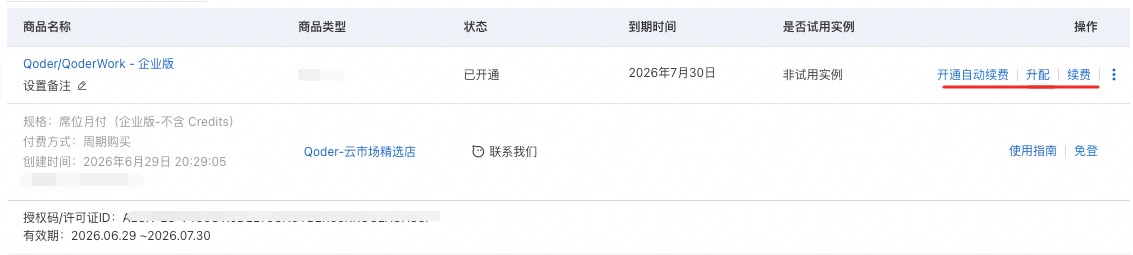
- For organizations that purchased on the official website, admins can go to the Members page > Adjust seat count to adjust the number of seats as needed.
- For organizations that purchased through the cloud marketplace, use the purchasing Alibaba Cloud account to go to the corresponding Service Details > Upgrade/Downgrade in the cloud marketplace to adjust seats as needed.
Subscription Renewal
- For organizations that purchased on the official website, admins can go to Subscription & Billing > Enable auto-renewal. Once enabled, the default payment method will be charged automatically at the end of each cycle.
- For organizations that purchased through the cloud marketplace, only Enterprise plans support auto-renewal. Use the purchasing Alibaba Cloud account to go to the corresponding Service Details > Enable auto-renewal in the cloud marketplace. Once enabled, the payment method configured in the Alibaba Cloud account will be charged automatically at the end of each cycle. See Auto-renewal for details.
Shared Add-on Credits
Administrators can purchase Shared Add-on Credits to supplement model compute capacity. These credits form a shared pool available to all organization members.
| Feature | Details |
|---|---|
| Pricing | $40 USD for 3,000 Credits (one-time purchase, stackable). |
| Validity | Valid for 1 year from the date of purchase or redemption. |
| Refunds | Non-refundable and non-transferable. |
How to purchase
How to purchase
Administrators can purchase credits by navigating to Organization Settings > Organization Usage > Shared Add-on Credits.Purchases made through a cloud marketplace can be redeemed using a redemption code. See About Redemption Codes.
Consumption priority
Consumption priority
When a member generates a request, Credits are deducted in the following order:
- The monthly seat quota
- Any personal add-on Credits purchased by the user
- The organization's Shared Add-on Credits
Usage limits
Usage limits
Administrators can set a maximum shared credit usage limit per member under Organization Settings > Members to manage resource consumption.
Billing & Payment Management
Enterprise plans support centralized billing.
For organizations that purchased on the official website:
- Order management: Navigate to Organization Settings > Subscription & Billing > Orders to review past orders, pay outstanding invoices, or cancel pending orders.
- Payment methods: Manage credit cards, set a default payment method, and update billing addresses under Organization Settings > Subscription & Billing > Manage Payment Information. Note: Updates apply to future transactions only.
- Billing and payment methods are managed within the Alibaba Cloud marketplace account. Please go to Alibaba Cloud Marketplace to manage.