

Deeplinks はカスタム URL に基づくナビゲーションメカニズムであり、ブラウザ、ドキュメント、ターミナル、その他の外部環境から Qoder IDE を直接起動し、指定されたページを開いたり、特定の操作を実行したりできます——例えばチャットの開始、Quest タスクの作成、ルールのインポート、MCP サービス設定の追加など。
コンテンツの書き込みや設定のインポートを伴う Deeplinks の場合、Qoder IDE は続行前に確認ダイアログを表示し、内容を確認してから実行します。一部の Deeplinks は、事前にアカウントにログインする必要があります。
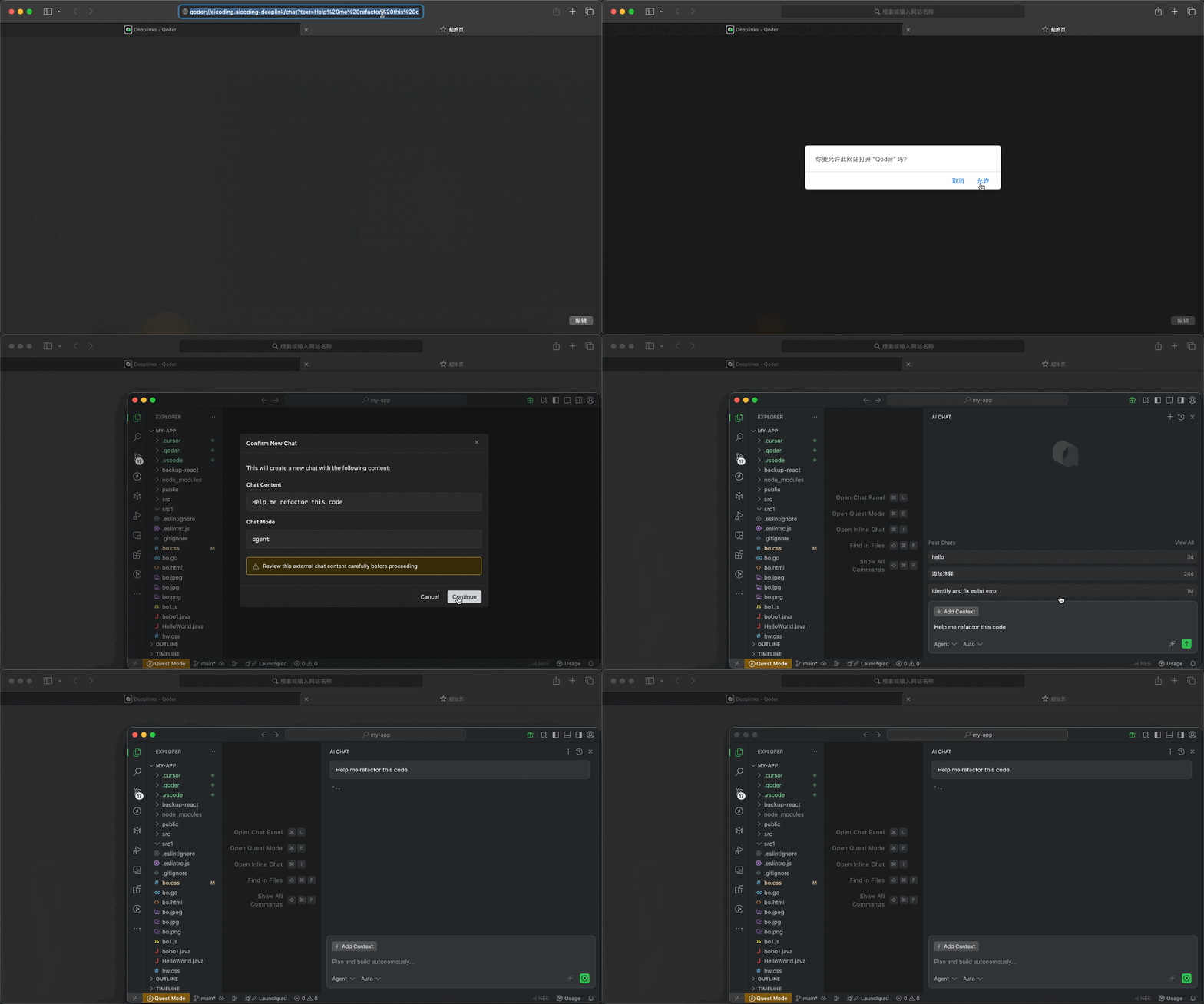
リンクを介してチャットセッションを直接開始します。リンクを開くと、Qoder IDE はまず新しい会話に持ち込まれるコンテンツを表示し、確認後に新しいチャットを作成して、自動的に送信することなく入力ボックスにテキストを事前入力します。使用する前にアカウントにログインする必要があります。
独立した Quest ウィンドウを開く、または前面に出し、New Quest の下書きを事前入力します。リンクを開くと、タスクの説明と実行モードを確認してから続行するかどうかを決定できます。使用する前にアカウントにログインする必要があります。
リンクを介して AI の動作をガイドするルールをインポートします。ルールでは、コーディング標準、プロジェクトの規約、AI 応答の特定の指示を定義できます。リンクを開くと、インポートするかどうかを決定する前に、ルール名とコンテンツをプレビューできます。確認後、対応するルールが作成されます。
リンクを介して MCP(Model Context Protocol)サービス設定をすばやく追加できます。MCP サービスは、追加のツールとコンテキストソースを提供することで AI の機能を拡張します。リンクを開くと、Qoder IDE はまず追加されるサービス情報を表示し、MCP 設定ページを開いて、内容を確認しながら承認できるようにします。
MCP service JSON エンコードプロセス:
リンクを介してカスタムコマンドをすばやく作成します。一般的なプロンプトテンプレート、プロジェクトの操作説明、チーム内の規約コマンドの配布に最適です。リンクを開くと、Qoder IDE はまずコマンド名、スコープ、説明、およびコンテンツを表示し、確認後に作成します。
Deeplinks URL は 8,000 文字を超えないようにしてください。長いコンテンツの場合は、以下を検討してください:
URL フォーマット
| 構成要素 | 説明 | 例 |
|---|---|---|
scheme | プロトコル | qoder |
host | Deeplinks ハンドラー識別子 | aicoding.aicoding-deeplink |
path | アクションパス | /chat, /quest, /rule, /command, /mcp/add |
parameters | URL クエリパラメータ | text=hello&mode=agent |
利用可能な Deeplinks タイプ
| パス | 説明 | ログイン必須 |
|---|---|---|
/chat | AI チャットを作成 | はい |
/quest | Quest タスクを作成 | はい |
/rule | ルールを作成 | いいえ |
/command | カスタムコマンドを作成 | いいえ |
/mcp/add | MCP サービスを追加 | いいえ |
AI チャットを作成 /chat
リンクを介してチャットセッションを直接開始します。リンクを開くと、Qoder IDE はまず新しい会話に持ち込まれるコンテンツを表示し、確認後に新しいチャットを作成して、自動的に送信することなく入力ボックスにテキストを事前入力します。使用する前にアカウントにログインする必要があります。
URL フォーマット
パラメータ
| パラメータ | 必須 | 説明 |
|---|---|---|
text | はい | 事前入力するプロンプト内容 |
mode | いいえ | チャットモード:agent、ask、chat、または Experts が有効な場合は experts。ask は内部では chat として扱われます。 |
isNewChat | いいえ | 新しいチャットを作成するかどうか。デフォルトは true。false にすると現在のチャットに事前入力します。 |
例
リンク生成コード
Quest タスクを作成 /quest
独立した Quest ウィンドウを開く、または前面に出し、New Quest の下書きを事前入力します。リンクを開くと、タスクの説明と実行モードを確認してから続行するかどうかを決定できます。使用する前にアカウントにログインする必要があります。
URL フォーマット
パラメータ
| パラメータ | 必須 | 説明 |
|---|---|---|
text | はい | タスクの説明 |
agentClass | いいえ | 実行モード:LocalAgent(デフォルト)または LocalWorktree |
実行モード
| モード | 説明 |
|---|---|
LocalAgent | 現在のワークスペースで実行 |
LocalWorktree | 分離された git worktree で実行 |
例
リンク生成コード
ルールを作成 /rule
リンクを介して AI の動作をガイドするルールをインポートします。ルールでは、コーディング標準、プロジェクトの規約、AI 応答の特定の指示を定義できます。リンクを開くと、インポートするかどうかを決定する前に、ルール名とコンテンツをプレビューできます。確認後、対応するルールが作成されます。
URL フォーマット
パラメータ
| パラメータ | 必須 | 説明 |
|---|---|---|
name | はい | ルール名(ファイル名として使用) |
text | はい | ルールの内容 |
例
リンク生成コード
MCP サービスを追加 /mcp/add
リンクを介して MCP(Model Context Protocol)サービス設定をすばやく追加できます。MCP サービスは、追加のツールとコンテキストソースを提供することで AI の機能を拡張します。リンクを開くと、Qoder IDE はまず追加されるサービス情報を表示し、MCP 設定ページを開いて、内容を確認しながら承認できるようにします。
URL フォーマット
パラメータ
| パラメータ | 必須 | 説明 |
|---|---|---|
name | はい | MCP サービス名 |
config | はい | Base64 エンコードされた MCP service JSON 設定 |
注意:設定にはcommandまたはurlのいずれかが含まれている必要があります。名前が既に存在する場合は、重複して追加することはできません。
例
リンク生成コード
MCP service JSON エンコードプロセス:
- 設定 JSON オブジェクトを作成
JSON.stringify()でシリアライズencodeURIComponent()で URL エンコードbtoa()で Base64 エンコード- 結果を
encodeURIComponent()で URL エンコード
コマンドを作成 /command
リンクを介してカスタムコマンドをすばやく作成します。一般的なプロンプトテンプレート、プロジェクトの操作説明、チーム内の規約コマンドの配布に最適です。リンクを開くと、Qoder IDE はまずコマンド名、スコープ、説明、およびコンテンツを表示し、確認後に作成します。
URL フォーマット
パラメータ
| パラメータ | 必須 | 説明 |
|---|---|---|
name | はい | コマンド名。小文字のアルファベット、数字、ハイフン、アンダースコアのみを含めることができます |
text | はい | コマンドの内容 |
description | いいえ | コマンドの説明 |
scope | いいえ | 適用範囲:user または project、デフォルトは user |
適用範囲
| 範囲 | 説明 |
|---|---|
user | 現在のユーザー環境にのみ追加されます |
project | 現在のワークスペースに追加され、チームの共有に適しています |
例
リンク生成コード
使用上の注意
- リンクをクリックすると、Qoder IDE は確認のためにコマンド情報を表示します。
nameは空にできず、小文字のアルファベット、数字、ハイフン、アンダースコアのみを使用できます。scope=projectには、現在ワークスペースが開かれている必要があります。そうでない場合は作成できません。- 同名のコマンドを重複して作成することはできません。
セキュリティに関する注意事項
重要: Deeplinks をクリックする前に、必ず内容を確認してください。
- 機密データを含めない: Deeplinks に API キー、パスワード、プロプライエタリコードを埋め込まないでください
- ソースを確認する: 信頼できるソースからの Deeplinks のみをクリックしてください
- 確認前に内容を確認: Qoder IDE は常に確認ダイアログを表示します。続行する前に内容を注意深く確認してください
- 自動実行なし: Deeplinks は自動的に実行されません。常にユーザーの確認が必要です
トラブルシューティング
| 問題 | 考えられる原因 | 解決策 |
|---|---|---|
| "Unregistered deeplink path" | サポートされていないディープリンクパス | パスがサポートされているか確認し、Qoder IDE バージョンが 0.2.21 以上であることを確認してください |
| "Missing required parameter" | パラメータが指定されていない | URL にすべての必須パラメータが含まれているか確認してください |
| "Invalid JSON config" | JSON の形式が正しくない | エンコード前に JSON 構造を検証してください |
| "Quest Mode is disabled" | Quest 機能が有効になっていない | 設定で Quest モードを有効にしてください |
| ログインプロンプトが表示される | ディープリンクに認証が必要 | 最初にアカウントにサインインしてください |
| "Invalid Base64 encoded config" | MCP 設定のエンコード順序が正しくない | 正しいエンコード順序を確認: JSON → encodeURIComponent → btoa → encodeURIComponent |
URL 長さ制限
Deeplinks URL は 8,000 文字を超えないようにしてください。長いコンテンツの場合は、以下を検討してください:
- プロンプトまたはルールの内容を短くする
- インラインコンテンツの代わりに外部参照を使用する
- 複数の Deeplinks に分割する