

Release history for QoderWork.
This page lists the release history for QoderWork, with the newest version first.
 🎉 Writing DeskIntroducing Writing Desk. Turn ideas into professional writing — no more staring at the blank page.Switch to "Writing" mode in the input box and tell it what you need — a blog post, a weekly update, a product doc, an email — QoderWork plans the structure, drafts the content, and shows it in a live preview on the right. Pick a tone of voice (professional, friendly, energetic, and more), tweak paragraphs, rewrite sentences, adjust styling. Need to look things up, pull data, or insert charts? It can call MCP tools right inside the workflow. When you're done, export in one click or keep iterating.For example, a marketing teammate writing a product launch post can switch to Writing mode, describe the key points and audience, get a clean draft in seconds, rewrite it in a friendlier tone, fix up the heading hierarchy — and the post is ready.🎉 Slides DeskIntroducing Slides Desk. One sentence in, a presentation-ready deck out.Switch to "Slides" mode in the input box, describe the topic and audience, and QoderWork plans the pages, generates the content, applies a coordinated visual template, and previews every slide on the right. Browse templates, preview each draft slide, confirm, and the full deck is generated. Once ready, present in fullscreen or export to standalone HTML so you can run it from any room.For example, when you're suddenly asked to give a talk: switch to Slides mode, describe the topic and outline, get a complete deck in seconds with a live preview, pick a template you like, and hit fullscreen — you're ready to go.🐛 Fixes
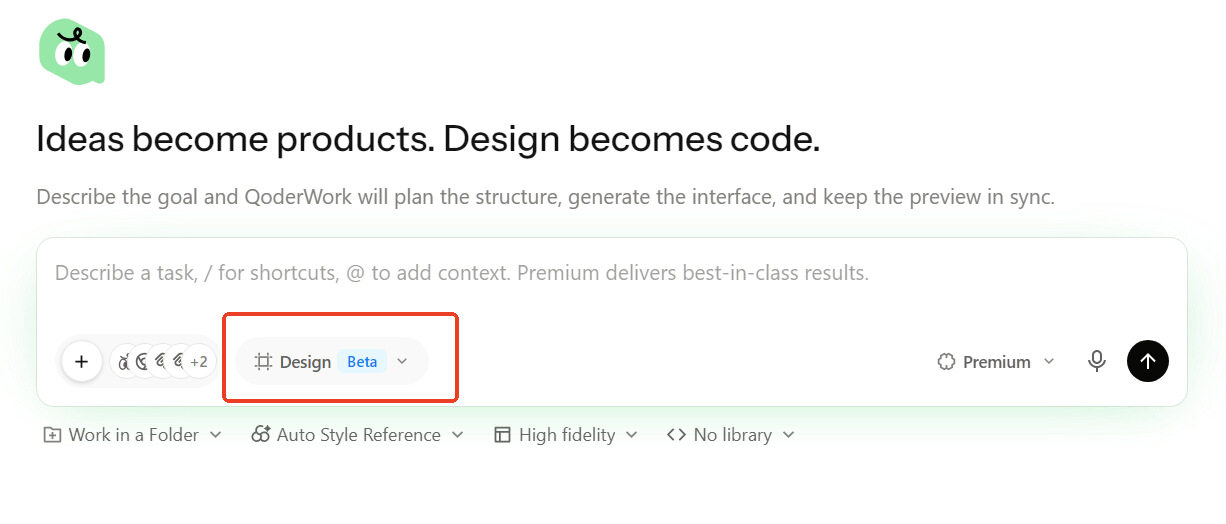 Switch to "Design" mode in the input box, describe what you need — "build a SaaS analytics dashboard" — and QoderWork plans the page structure, generates the full interface, and shows it in a live canvas preview on the right. Choose from 100+ style references including Apple, Stripe, and Linear. Toggle between wireframe and high-fidelity. Use Ant Design, shadcn/ui, or other component libraries. After generation, fine-tune colors, spacing, radius, and light/dark theme — then export or hand off to Cursor, Zed, or any dev tool you use.For example, a product manager who needs a quick prototype can switch to Design mode, say "task management dashboard in Linear style", get a high-fidelity preview in seconds, tweak the colors, and export — no Figma needed.✨ NewVoice input: talk instead of typePress the shortcut to start talking — transcription fills the input box automatically. Works when you're walking, between meetings, or when your hands are busy. Supports Fn key, custom keys, and key combinations. Configure it your way in Settings.🐛 Fixes
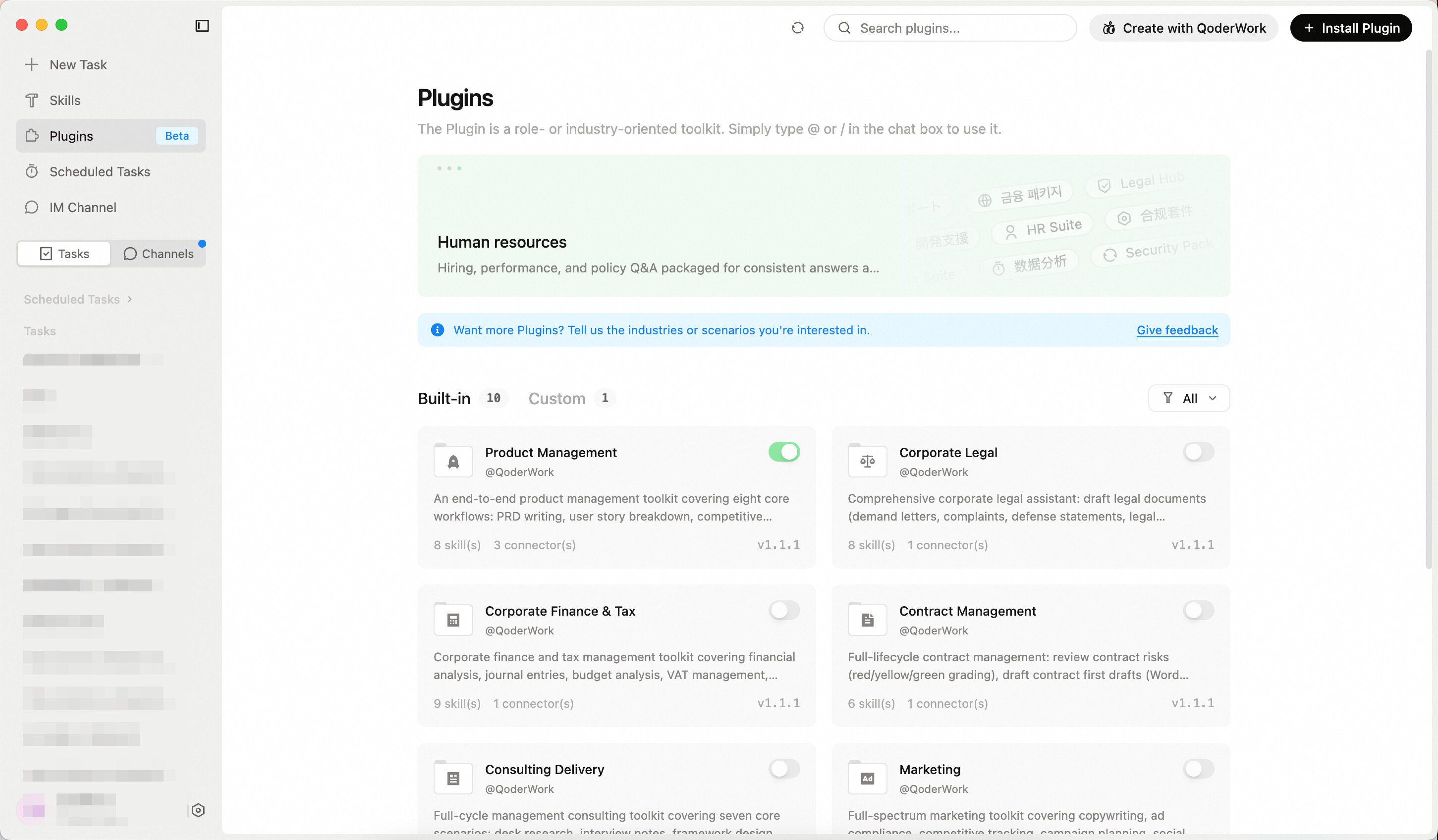 Expert Kits don't just connect AI to tools — they give AI professional-grade capabilities for specific roles.✨ New

Everyday Polish
This release fixes skill installation and conversation display issues, with clearer error messages.🐛 Fixes- Fixed skill installation failing in certain cases
- Fixed history messages occasionally overwriting the current conversation
- Improved error messages for clearer descriptions
- General stability improvements
Everyday Polish
A focused round of fixes for a smoother, more reliable session experience.🐛 Fixes- Fixed occasional ghosting and overlapping messages when scrolling the conversation view
- Fixed tool confirmation dialogs reappearing in older conversations
Everyday Polish
This release fixes several issues affecting conversations, voice input, and the skill marketplace.🐛 Fixes- Fixed messages occasionally overlapping in the conversation stream
- Fixed voice input failing to connect in proxy network environments
- Fixed category filtering and pagination in the skill marketplace
- Fixed IM message replies occasionally being lost or arriving out of order
- Fixed incomplete conversation loading when switching between tasks
- Windows: Adjusted the default voice input shortcut to avoid system conflicts
Only Your Voice Gets Through
Voice input now supports voiceprint isolation — background voices no longer make it into your transcript. The built-in docx and pptx skills also get a systematic upgrade.✨ New- Voiceprint isolation for voice input Turn on the new Voiceprint toggle in voice input settings (off by default). Each time you start recording, QoderWork picks up your speaking profile from the opening moment of the session, then keeps only your voice in the transcript — nearby chatter, distant conversations, and ambient noise are suppressed before ASR and any post-polishing. Meetings, cafes, or a chatty room won't leak in anymore.
- docx & pptx skills refreshed Generate polished Word documents and slide decks from a single prompt — docx now supports template filling and direct Markdown-to-DOCX conversion, and pptx produces more consistent, cleaner output.
- Knowledge base ZIP upload & large-file direct transfer Upload entire ZIP archives to your knowledge base, and large files now use a direct-upload channel for better speed and reliability.
- Dock / taskbar unread indicator Both macOS and Windows now let you toggle the unread badge on the Dock or taskbar icon from Settings.
- Refined context-window dialog The dialog for setting each model's context window (accessed from the model picker) has been cleaned up — clearer fields and smoother switching.
- Connector Market routing The Connector, Skill, and Plugin marketplaces now filter by product and version so only relevant items show up.
- Fullscreen for in-chat MCP apps MCP apps in conversations now support fullscreen mode, with side-canvas state preserved.
- Personal top-up entry Personal credit top-up is now reachable from both Settings and Usage overview.
- Resolved quality-of-life issues across knowledge base, Connector Market, and MCP apps
- Improved Windows update flow and overall stability
1M Context Window
This release introduces per-model context window settings — configure up to 1M tokens for each model. Voice input also gets a major upgrade with hands-free auto-send and faster polishing.✨ New- Context window settings A new "Model Settings" entry at the bottom of the model picker lets you set each model's context window size (up to 1M tokens) — applies globally once configured.
- Hotkey auto-send Press the voice hotkey to start, press again to stop — and it sends automatically. No more extra tap on the send button.
- Faster voice polishing — Polished text appears almost instantly after recording stops, with no visible delay.
- Clearer archive prompts — The archive confirmation dialog now shows the path to find archived items later.
- More syntax highlighting — Markdown previews now highlight additional popular programming languages.
- Fixed Windows installer type detection causing wrong update packages, broken shortcuts, and browser connector path errors
- Fixed network connections dropping when system proxy is unavailable
- Fixed miscellaneous UI issues including HTML preview white screen, voice preview overflow, and paste formatting artifacts
Slack IM Channel
QoderWork now connects to Slack as an IM channel — native streaming replies, on par with the other IM channels. This release also brings the MCP Apps protocol along with enterprise-grade MS365 access.✨ New- Slack IM channel A new Slack IM channel connector with native streaming replies, on par with DingTalk, Feishu, and other supported IM platforms.
- Suite sharing User-created expert suites can now be shared via a link — colleagues open the link and use the suite out of the box. Built-in marketplace suites do not support sharing yet; this will be enabled in a future release.
- Qbaike connector A new Qbaike connector lets you look up corporate registry info in chat — fuzzy company search, basic info and change history, contact details, key personnel, shareholders, beneficial owners, and ultimate controllers.
- MCP Apps protocol QoderWork now supports the MCP Apps message and context protocol, enabling connectors to deliver richer interactive UI and structured results.
- MS365 enterprise mode Opt in to unlock organization-level permissions (Teams channels, directory, etc.). OneDrive authorization prompts also no longer pester you repeatedly — after a decline or timeout, QoderWork backs off automatically, and file uploads are more reliable overall.
- Cleaner connector cards Connector cards show only what matters; refresh behavior and bundled skills for installed connectors are now in sync.
- Faster model list The model list now loads from a local cache — noticeably faster on startup and when switching. Model detail cards also support Markdown links, and off-peak discounts are clearer.
- Lighter logout Sign-out is now non-blocking — the UI switches immediately while resources are released in the background.
- Fixed popovers being unexpectedly dismissed when used inside a dropdown menu
- Fixed the image viewer close button having too small a hit area
- Fixed being stuck on the settings page after a redirect
- Fixed announcement banners being click-through to elements below
- Fixed lost attachments in multi-part messages and out-of-sync file state in the chat input
- Slack: fixed slash command reply updates and filename special-character handling
- WeCom: fixed missing error feedback when message sending fails
Everyday Polish
General stability and quality-of-life improvements.🐛 Fixes- Fixed an occasional compatibility issue when using the DingTalk connector from Git Bash on Windows
Manual Context Compression & Off-Peak Discounts
Context compression now supports manual triggering on top of the existing automatic mode — free up space whenever you want. Qwen3.7-Max and Qwen3.7-Plus also gain off-peak promotions for friendlier pricing.✨ New- Manual Context Compression Beyond the existing automatic compression, a new compress button next to the usage indicator (right side of the input box) lets you compress chat history into a summary on demand.
- Qwen3.7 Off-Peak Discounts Qwen3.7-Max and Qwen3.7-Plus now run off-peak promotions. Open the model selector to see the current campaign banner.
- Reference a Browser Tab Use the "+" entry next to the input box to attach the current browser tab to your QoderWork input — no more copying and pasting URLs.
- Input draft preserved across tasks Switching between conversations no longer wipes unsent text in the input box.
- Resolved various issues for a smoother daily experience
Advanced Model Tier
The model selector now offers an Advanced tier between Ultimate and Standard, with credit multipliers shown next to each option for clearer cost-vs-capability choices. This release also adds a right-click editing menu and a shortcut guide, brings real-time voice transcription to the input box, and upgrades the browser connector to V2.✨ New- Advanced tier in the model selector A new Advanced tier sits between Ultimate and Standard. Credit multipliers are now visible next to each tier, making cost-vs-capability trade-offs clear at a glance.
- Input box right-click menu Right-click the input box to access cut, copy, paste, undo, and other edit actions.
- Shortcut guide A new entry in the title bar lets you browse available keyboard shortcuts at any time.
- MCP marketplace additions Two new industry plugins: 1688 Buyer Assistant and 1688 Seller Assistant.
- Real-time voice transcription Voice input now streams text into the input box as you speak — no waiting until you finish.
- Browser connector V2 The browser connector has been rebuilt on a new architecture for more stable and responsive connections.
- Fixed AppShot permission and shortcut conflicts.
- Fixed pinned conversations not staying at the top in custom groups.
- Fixed older conversation history occasionally appearing blank.
- Fixed unexpected exits when closing or minimizing windows on Windows.
- Fixed several display issues with the Parchment theme and serif font mode.
Everyday Polish
General stability and quality-of-life improvements.🐛 Fixes- Fixed occasional issues during app update and restart.
Awareness Mode is here!
Awareness Mode is now available to everyone — QoderWork remembers your preferences, project conventions, and working context across sessions, getting better the more you use it.🎉 Awareness ModeA new way to work — the longer you use QoderWork, the more it feels like a partner who already knows you.QoderWork now automatically captures your preferences, project structure, tool habits, and communication style, maintaining continuous memory across sessions. No more repeating background context — it already knows. Powered by a three-layer mechanism of memory, reflection, and skill self-evolution. In Settings you can choose between "automatic" and "manual" memory maintenance, working at your own pace.✨ New- Reference tasks from the @ menu The @ panel now lets you reference existing tasks and scheduled tasks, making it easier to connect context across sessions.
- Conversation width preference A new setting lets you choose between default and wide conversation layout — great for large screens.
- New built-in expert plugins Two new plugins: Tech Services and Litigation Toolkit.
- Resolved various issues for a smoother daily experience.
Everyday Polish
General stability and quality-of-life improvements.🐛 Fixes- Fixed an issue where tasks could terminate unexpectedly during execution.
Everyday Polish
General stability and quality-of-life improvements.🐛 Fixes- Fixed model list failing to load in certain environments.
Everyday Polish
General stability and quality-of-life improvements.✨ New- Custom grouping & sorting for conversations Group your conversation list by custom groups, workspace directory, or time — and switch between sort orders.
Everyday Polish
General stability and quality-of-life improvements.New Plugin & Connectors
A new built-in Product Design plugin lands, three new industry connectors join the MCP marketplace, and conversation archiving gets refined.✨ New- Product Design plugin A built-in expert plugin for product design scenarios, ready to use out of the box.
- MCP marketplace additions Three new industry connectors — Amap Cloud Maps, Huayu Yuandian, and PKULaw.
- Refined conversation archiving A smoother archive experience, now also covering bulk archiving of scheduled tasks — keep long-unused items tidied away in one move.
- Mount a whole plugin from the @ panel The @ panel now lets you bring in an entire expert plugin in one tap, instead of picking skills one by one.
- Standalone toggle for the voice floating window The bottom-of-screen voice input window summoned in the background now has its own toggle in Settings.
- Resolved various issues for a smoother daily experience.
Everyday Polish
General stability and quality-of-life improvements.Windows Computer Use
Computer Use is now available on Windows — QoderWork can see your screen and operate applications, just like on macOS. Also in this release: Connectors join Skills and Plugins in a unified "Extensions" section in the sidebar.✨ New- Windows Computer Use Enable it in Connectors and QoderWork can see your screen and interact with applications on Windows, helping you complete cross-app tasks.
- Unified Extensions section Connectors have been promoted from Settings into the sidebar, joining Plugins and Skills under one "Extensions" group. Card interactions and styling are now consistent across all three.
- General stability and quality-of-life improvements.
Enterprise Management
This release introduces a set of management and governance features for enterprise administrators, enabling organizations to adopt QoderWork at scale with unified control.✨ New- IM Channel Access Control Admins can now govern which IM conversations are allowed to connect to QoderWork. Pair and authorize contacts or group chats individually—unauthorized sessions require admin approval before they can access QoderWork, keeping members safe from unwanted conversations while giving the organization controlled, on-demand IM access.
- General stability improvements for a smoother overall experience.
macOS Computer Use
Computer Use is now available by default on macOS — QoderWork can see your screen and interact with apps on your behalf. AppShot and voice polish are also live.✨ New- macOS Computer Use Enable it in Connectors and QoderWork gains the ability to see your screen and operate applications, helping you get cross-app tasks done.
- AppShot Capture the current app's screen in one click — it lands right in your QoderWork input box, giving QoderWork a clear picture of what you're working on.
- Voice polish Spoken input is now auto-refined into smoother written text. A first-launch guide helps you get started.
- General stability and quality-of-life improvements
Everyday Polish
General stability and quality-of-life improvements.Qwen3.7-Max
New model, limited-time promotional rate.✨ New- Qwen3.7-Max Now available in the model selector — try it at a limited-time promotional rate.
Everyday Polish
General stability and quality-of-life improvements.Everyday Polish
Fixed Dock icon glitches after macOS updates.Writing Desk and Slides Desk are here!
Writing Desk and Slides Desk are now live — from a rough idea to a polished post, from a few lines of prompt to a ready-to-present deck, all in one place inside QoderWork.- General stability improvements for a smoother day-to-day experience
Everyday Polish
General stability and quality-of-life improvements.Design Desk and Voice Input are here!
Design Desk is here — describe your idea, get a real deliverable. Not just for designers: anyone can go from idea to professional design to runnable code, all in one place. Voice Input launches alongside — just say it and it gets done.🎉 Design DeskIntroducing Design Desk. Ideas become products. Design becomes code.- Fixed Dock icon display issues after updating on macOS, and unexpected main window defocus on launch
- General stability improvements
Message Recall
Press ↑/↓ in the chat input to cycle through your previous messages — just like a terminal.✨ New- Arrow-key message recall Press ↑ or ↓ in the input box to instantly recall messages you've sent in the current conversation. Edit and resend without retyping.
- Fixed in-chat search accuracy, IM channel sync issues, and other daily-use annoyances
- Resolved several crashes for improved overall stability
Everyday Polish
General stability and quality-of-life improvements.Network Proxy
QoderWork now supports global network proxy configuration — use it behind corporate firewalls or restricted networks without issues. You can also search across all conversations to quickly locate past tasks.✨ New- Network proxy Configure a global proxy in Settings to route all network traffic through it — works behind corporate firewalls and restricted environments.
- Global task search Search across all your conversations to quickly find past tasks and messages.
- Resolved various issues including HTML preview rendering, glass theme display, and credit usage icon visibility.
Task Groups
Conversations can now be organized into groups — managing a busy task list just got easier. This release also addresses a number of quality-of-life issues.✨ New- Task groups Organize your conversations into groups, making it easier to find what you need when tasks pile up.
- Resolved various issues including sidebar layout and Windows upgrade stability.
Everyday Polish
General stability and quality-of-life improvements.DingTalk Workspace CLI
QoderWork now connects to the DingTalk Workspace CLI — manage todos, reports, attendance, and 10+ modules in natural conversation.✨ New- DingTalk Workspace CLI (DWS)
Enable the DingTalk connector and use natural language to manage todos, daily reports, attendance, calendar, approvals, and more. No more navigating pages and clicking buttons — just say what you need.

- Guided connector setup Connectors now offer a step-by-step setup flow with automatic authentication — faster onboarding, fewer manual steps.
- Input bar refinements Improved connector grouping and behavior in the chat input.
- Resolved various issues related to conversation cancellation, connector display, IM channel list, and overall page stability.
Expert Kits: Now Available
The past few releases focused on ongoing stability and experience improvements. With 0.3.15, we're introducing Expert Kits — 10 built-in kits covering legal, finance, contract management, product management and more, turning AI from a generalist into a domain expert. Custom kit creation and sharing are also supported.- 10 Built-in Kits at Launch Covering finance, legal, marketing, and more — ready to use out of the box. Multiple kits can be used in a single conversation. For example, combine "Contract Management" and "Corporate Legal" to handle legal review and contract generation in the same workflow.
| Kit | Description |
|---|---|
| Product Management | PRD writing, user story breakdown, competitive analysis, requirement prioritization, user feedback analysis, roadmap updates, product metrics review |
| Corporate Legal | Draft legal documents, generate corporate resolutions, case research with win-rate analysis, compliance review, risk assessment |
| Contract Management | Contract review, contract drafting, redline comparison, NDA quick screening, statute lookup, contract ledger reminders |
| Corporate Finance & Tax | Financial analysis, bookkeeping vouchers, budget analysis, VAT management, annual settlement, internal audit, financial statements, month-end closing |
| Consulting Delivery | Desk research, interview notes, framework design, report writing, benchmarking, weekly reports, CEO briefings |
| Marketing | Marketing copy, ad compliance, competitor tracking, campaign planning, social media trending, SEO optimization, campaign analytics, brand consistency review |
| Investment Research | In-depth reports, industry research, annual report analysis, earnings flash reviews, research notes, morning meeting briefs, research summaries, comparable company analysis |
| Investment Banking | IPO prospectus drafting, M&A reports, bond offering memorandums, exchange inquiry responses, roadshow materials, financial modeling |
| Private Equity | Project screening, due diligence checklists, term sheet review, investment committee memos, return modeling, exit analysis |
| Wealth Management | Market briefings, asset allocation, fund analysis, client reporting, financial planning, tax planning |
Everyday Improvements
Versions 0.3.8 through 0.3.11 bring a wide range of everyday usability improvements.🔧 Improvements- Settings Page Refined layout and updated copy
- Fixed various issues affecting daily usage
- Fixed several Windows platform compatibility issues
- Additional stability improvements
Desktop Control from IM
This release bridges IM and desktop — control your tasks right from your IM conversations, with new capabilities like Generative UI.✨ New- IM Binding Use /bind in any IM conversation to connect to an active desktop task — interact with it remotely, anytime, anywhere. The desktop UI shows binding status in real time, and /unbind disconnects when you're done.
- Generative UI (experimental) Agents can now go beyond text — they can render interactive components like buttons and tables right in the conversation. To try it, flip its toggle under Experimental Features in Settings.
- Context usage indicator
A new indicator below the input box shows context usage — when it's full, start a new task to save credits.

- Simplified DingTalk bot setup You can now scan a QR code directly in the IM channel to create and configure the DingTalk bot — faster and easier than before.
- Fixed UI issues including thinking-mode scroll jumping, Windows desktop shortcut loss, and image path display
- Fixed functional issues with skill market sharing/installation and IM card status sync
- Fixed MCP authentication and CJK URL auto-linking
- Reduced idle resource usage
Skill Sharing
This release introduces Skill Sharing, WeCom bot integration, and a Microsoft 365 connector, along with on-demand MCP tool loading and a redesigned browser extension.✨ New- Skill Sharing Share skills you’ve created directly with others—recipients can install them with a single click.
- WeCom Bot A new WeCom channel lets you chat with QoderWork right inside WeCom.
- Microsoft 365 Connector Connect to data and services across the Microsoft 365 ecosystem.
- On-Demand MCP Loading MCP tools now load on demand instead of all at once, resulting in faster startup times.
- Browser Extension Upgrade The browser extension has been completely redesigned for a smoother experience and improved stability.
- DingTalk and Feishu IM now support streaming output
- Fixed interaction issues including message attachments not opening on click and Command+F clearing search text
- Fixed functional issues with skill installation and scheduled task history display
- Fixed various issues in Feishu and DingTalk IM
Custom Shortcuts & Browser Experience
Versions 0.3.1 through 0.3.4 focused on stability and usability improvements. Building on that, this release makes daily use smoother — customizable shortcuts, better browser experiences, and additional improvements.✨ New- Customizable shortcuts You can now configure keyboard shortcuts for sending messages and line breaks in Settings — use Enter to send or to insert a new line, your choice.
- Multi-session browser Multiple conversations can now use the browser tool simultaneously, each working independently.
- Browser extension officially launched The browser extension is now live on the Chrome Web Store with a streamlined installation experience. We recommend uninstalling the old extension and installing the official release for the best experience.
- HTML preview external links Links in HTML previews now open directly in your system browser.
- Refined theme details for better visual comfort
- Resolved various issues for a smoother daily experience
IM Channels
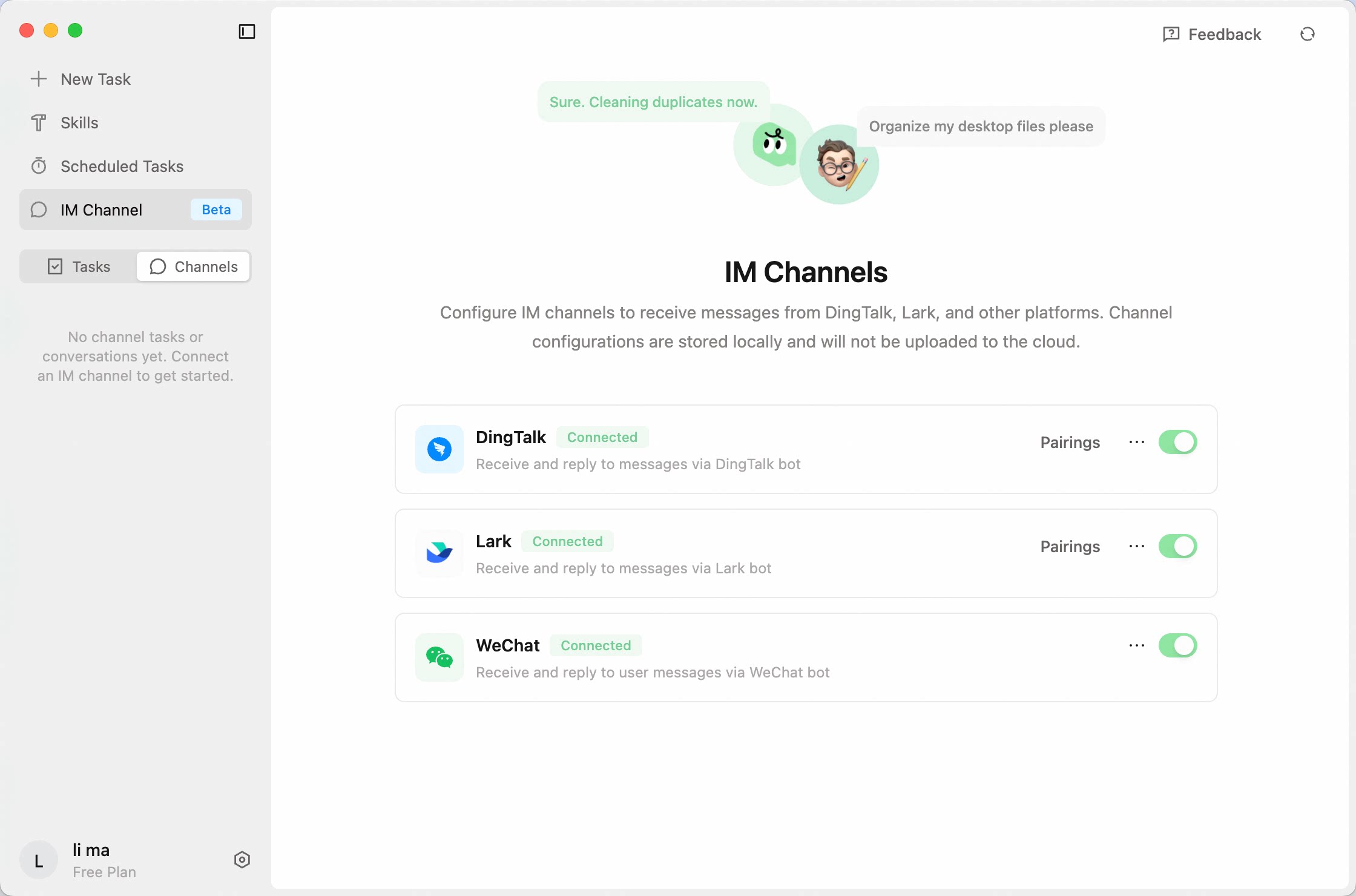
QoderWork is no longer just waiting on your desktop. This release launches IM Channels — talk to QoderWork right inside DingTalk, Feishu, or WeChat, wherever your day already happens.🎉 IM Channels Open Configuration, set up your bot, and find it in your favorite chat app — that's it. Everything you've configured on the desktop carries over — your Skills, MCP, Connectors, all of it.- Works with DingTalk, Feishu (Lark), and WeChat
- DingTalk and Feishu support both direct messages and group chats (just @mention the bot); WeChat supports direct messages
- Pairing mode is on by default — only direct messages and group chats you've authorized can interact with your bot
Settings Refresh
This release polishes the Settings page and connector interactions, and adds a changelog entry point. A round of stability and display fixes are also included.🔧 Improvements- Settings & connector interaction polish Refined the Settings layout and connector configuration flow for a smoother experience.
- Changelog entry point Added a changelog entry point so you can check what's new at any time.
- Fixed a number of issues affecting daily usage.
HTML Rendering
HTML now renders in-app — preview your web pages right in the conversation. This release also polishes the usage panel and includes a round of bug fixes.✨ New- HTML rendering HTML files now render in-app, so you can see your web pages take shape without switching to a browser.
- Usage panel polish Polished the usage overview layout — remaining credits are now easy to spot at a glance.
- Fixed a number of issues affecting daily usage, including duplicate messages, update notification popups, Settings dialog behavior, and image display.
Patch
Fixed a browser extension compatibility issue.Bug Fixes
Fixed a number of bugs affecting daily usage.Scheduled Tasks
🎉 Scheduled Tasks are live.Let QoderWork handle recurring tasks for you — all managed from a dedicated sidebar. This release also introduces macOS Connectors and math formula rendering.✨ New- Scheduled Tasks Create them manually from the sidebar, or tell QoderWork in conversation and it sets them up for you. Tasks are automatically grouped for easy management, with execution results and history always accessible.
- macOS Connectors Enable them in Settings. QoderWork can read and write your Notes, Calendar, Reminders, Mail, and Contacts — no extra setup required.
- Math formula rendering LaTeX math formulas now render properly.
Browser Connector
QoderWork introduces the Browser Connector — a zero-dependency, zero-config way to connect your real browser, completely replacing complex browser MCP setups.✨ New Features- Browser Connector Seamlessly integrates via a browser extension with no extra dependencies. Reuses your real browser so cookies and login sessions are preserved out of the box. Carries your authentic browser fingerprint to avoid bot detection. Lets you manually select which tabs to connect, giving you precise control over what the AI can access. Click the setup link in the chat box and follow the guide to load the extension.
Bug Fixes
Fixed a few issues affecting daily usage.🐛 Fixes- Fixed "Add to Chat" quoted content being sent to the AI as unreadable raw tokens instead of properly formatted text
- Fixed an occasional blank screen when switching between tasks
- Fixed the "Open with" menu for output files showing no available applications
Direct Connect
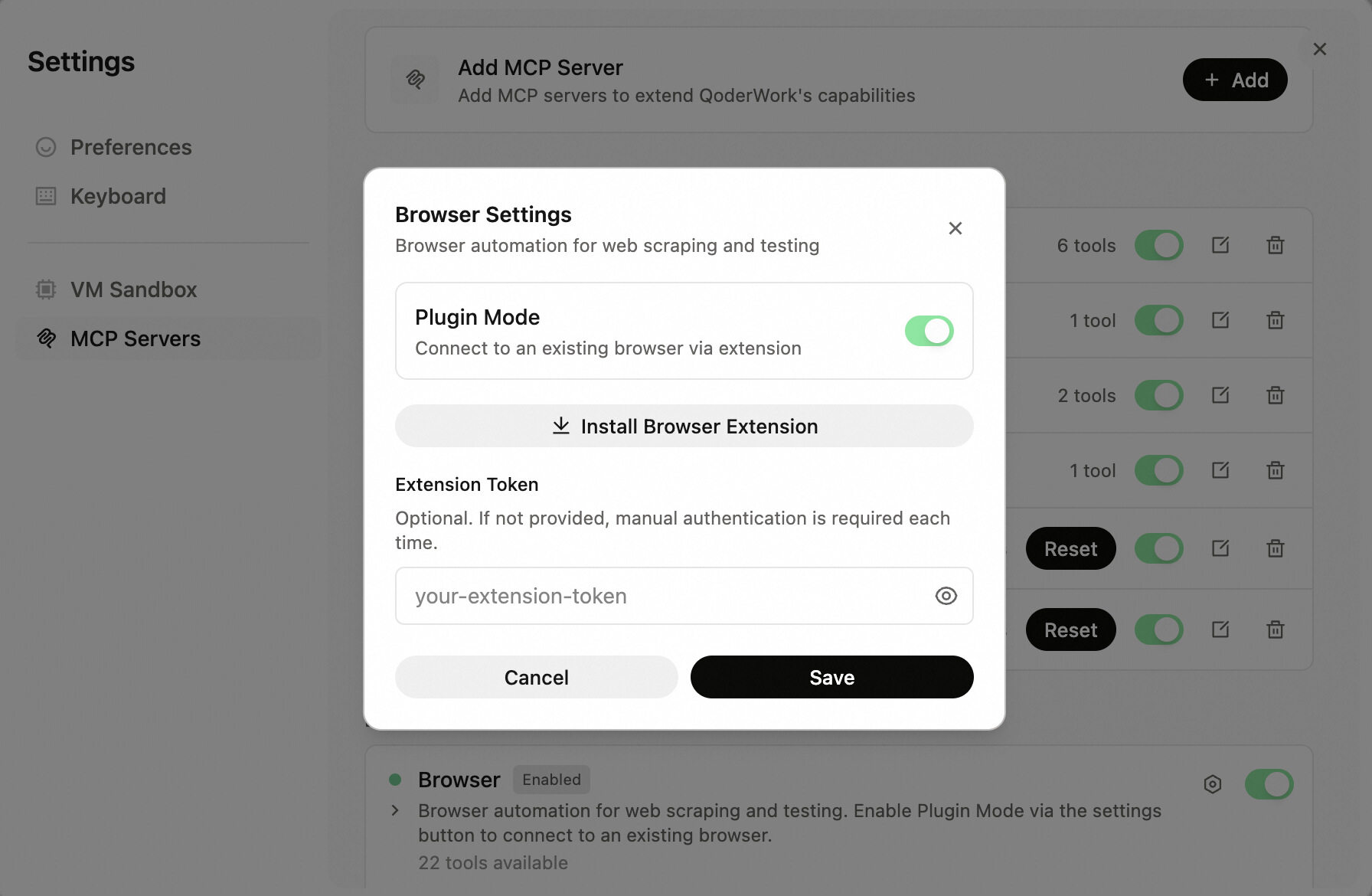
The Browser tool now supports Plugin Mode — flip the toggle to connect to your existing browser.🔧 Improvements- Browser Plugin Mode Turn on Plugin Mode to connect to your existing browser session — complete with all your logins and cookies.
Bug Fixes
Fixed a number of issues affecting daily usage, including QuickPick input, message sending, window display, and Windows platform compatibility.Safer File Ops
A small but meaningful update that makes file handling safer and fixes a model list loading issue.🔧 Improvements- Safer file operations File handling is now more cautious and controlled, reducing the risk of unintended changes.
- Fixed an issue where the model list could fail to load.
The Little Things
A round of detail-level polish and bug fixes to make everyday use more reliable.🔧 Improvements- Expanded QoFounder contact fields A new "Other contact" field lets you share additional ways to reach you.
- File context menu Right-click any file card to open it, reveal it in your file manager, copy its path, or choose which app to open it with.
- Fixed a race condition where the first message in a new task would occasionally not appear.
- Various other fixes including local session recovery, feedback submission, and startup stability.
Built-in create-skill
This release adds a handy new built-in skill: you can now create your own skills right in conversation. A few stability bugs have been fixed along the way.✨ New- Built-in create-skill Create custom skills directly in conversation — no manual file setup needed.
- Fixed an issue where conversation history could fail to restore in certain scenarios
- Fixed a potential crash on startup
- Fixed some UI cards not displaying correctly after a page refresh
Stability & Polish
The last release introduced a number of new features — this one is all about making them rock-solid. Several bugs affecting daily usage have been fixed.🐛 Fixes- Fixed an issue where trial credits were not correctly granted to new users
- Fixed Agent question cards losing their layout after a page refresh
- Fixed stale error banners persisting after switching accounts
- Fixed occasional failures in conversation title generation
Cross-Platform Polish
This release focuses on cross-platform polish and everyday quality-of-life improvements. Smarter architecture detection, more reliable MCP diagnostics, and a batch of Windows fixes. ✨ New- Language switcher on login A new toggle on the login page lets you switch between Chinese and English.
- Smart architecture detection QoderWork now automatically detects your system architecture on first launch and guides you to the correct installer.
- Better MCP diagnostics QoderWork now prompts you to shut down the VM before running MCP diagnostics, so issues can be diagnosed directly on the host machine.
- Fixed an issue where content pasted from rich-text editors like Word was incorrectly recognized as an image
- Fixed an issue where messages could get mixed up when sending tasks in rapid succession
- Fixed skill examples failing to load
- Windows: Fixed close button behavior (now minimizes to tray), tray icon, context menu, and other platform-specific issues
Experience, Refined
This release focuses on polish rather than big features — but you'll notice it feels smoother. We've also revamped how conversation titles are generated.✨ New- Smarter conversation titles Auto-generated titles are now more accurate and distinctive, making it easier to find past conversations.
- Resolved several issues that could occur during startup
- Fixed an issue where Cmd+W failed to close the window in conversation history on macOS
- Various other minor fixes and improvements
QoderWork just got a major upgrade
This is the biggest update in QoderWork's history. We're officially launching on Windows, and shipping VM sandbox support on both macOS and Windows simultaneously — starting today, whether you're on macOS or Windows, QoderWork can handle your tasks in a secure, isolated environment.🎉 Windows Is Here QoderWork is no longer macOS-only. After extensive development and testing, we're bringing the full QoderWork experience to Windows — natively built, deeply optimized, and ready to go out of the box.Supported platforms: macOS 14+ | Windows 10+🎉 VM Sandbox — Launching on Both Platforms Also headlining this release: VM sandbox support ships on macOS and Windows at the same time, with full platform coverage from day one.Why you'll love it:- Pre-configured environment, zero setup: Core runtime dependencies ship built-in, eliminating tedious configuration and making task execution faster than ever.
- Sandboxed isolation, clean execution: Tasks run in complete isolation from your local environment — no dependency conflicts, no environment pollution, and no more "it works on my machine."
- Local processing, total control: Your files stay on your machine. Sensitive data never leaves your device, ensuring privacy and security by design.
- Browse and search the full skill catalog
- One-click install / uninstall — ready to use instantly
- Preview demo scenarios for inspiration
Hello, World!
Hey, I'm QoderWork! Nice to meet you.As the newest member of the Qoder family, I bring Qoder's Agent capabilities beyond coding into your everyday work. I'm a desktop AI assistant — simply describe what you need, and I'll take care of the rest.Here's what we can accomplish together:- Describe Goals, Deliver Results: I'm not just a chatbot. Tell me what you want to achieve, and I'll autonomously plan, break down tasks, execute step by step, and deliver the final output. The entire process is fully transparent, so you stay in control.
- File Organization & Data Processing: Whether it's auto-sorting a messy project folder, organizing a photo library by date and location, or cleaning and analyzing CSV/Excel data to produce visual reports — just say the word.
- All-Around Document Creator: From Word reports, PowerPoint presentations, and Excel spreadsheets to Markdown documentation and professional PDFs — I can generate them from scratch with proper formatting and polished layouts.
- Research & Information Synthesis: I can search the web for the latest information, aggregate multi-source data, extract key insights, and help you quickly produce well-structured research reports.
- Extensible Capabilities, Limitless Scenarios: I come with built-in MCP integrations (GitHub, Amap, browser automation, and more) and support custom Skills, allowing you to build your own intelligent workflows for virtually any scenario.
- Local & Secure: I run locally on your device and never access any files without your explicit permission. Your data stays in your hands — always safe and under your control.