> ## Documentation Index
> Fetch the complete documentation index at: https://docs.qoder.com/llms.txt
> Use this file to discover all available pages before exploring further.
# Better Harness
> An agent that reviews your project's Harness Engineering and points out where the gaps are — and can start a fix task for you with one click.
## What is Agent Harness
Today's Coding Agents can read requirements, modify code, run tests, and even submit Pull Requests. But "can do a lot" doesn't mean "does it well." An Agent typically cycles through "understand the task — take action — check results — adjust" repeatedly — this is the Agent Loop.
A truly reliable Loop isn't just about keeping the Agent moving. It's about making sure the Agent knows what the goal is, what it must not touch, how to tell whether the result is correct, and what to do when something fails. Otherwise, it might change a lot of code, run a lot of tests, and still be unable to prove the task is actually done.
This is what Loop Engineering and Harness Engineering aim to solve: preparing the project context, relevant development tools, validation methods, and clear safety boundaries for the Agent, making every Loop closer to reliable delivery.
In Qoder, Loop Engineering covers the following asset types: Rules, Skills, Hooks, MCP configurations, Custom Agents, Plugins, and Session Insights.
## Why you need Better Harness
Building good Loop Engineering is hard. Rules that should exist are only in someone's head. Recurring feedback never gets fixed into a rule. Team conventions live in Slack threads instead of `AGENTS.md`. Most teams don't have the bandwidth — or a clear standard — to sit down and get it right.
**Better Harness** is our attempt to close that gap. It's an Agent that reviews your project's Loop Engineering for you, tells you which parts are strong and which are weak, and — for every gap it finds — can start a fix task with one click.
In the latest Qoder, you can enter Better Harness through the visual interface to launch an analysis and fix issues, or run `/better-harness` directly. It analyzes how the Agent executes tasks, identifies missing or weak key elements, and helps you understand what to strengthen next.
## How Better Harness works
Better Harness checks not just a single answer, but the entire harness supporting the Coding Agent: whether goals and context are clear, whether the project is easy to run, whether permissions are controlled, whether validation is effective, whether delivery is safe, and whether the team and Agent can continuously learn from tasks.
The main analysis process:
1. **Map the current Harness** — identify goals, context, execution entry points, feedback loops, delivery mechanisms, and learning capture.
2. **Find breakpoints** — explain which link is missing a mechanism, integration, actual execution, or evidence of results.
3. **Choose the minimal improvement vehicle** — assign the problem to the most appropriate Rule, Skill, Hook, script, automation, or human gate.
4. **Fix and verify** — scope the repair, run relevant validation, then re-run `/better-harness` to check whether the Loop has actually improved.
During analysis, Better Harness has a main analysis flow that collects raw data, then hands it to three independent read-only sub-Agents that each interpret a different category of evidence: **Agent customization assets** (whether Rules, Skills, Hooks, and other configurations are complete and usable), **real task session records** (what the Agent actually did in real tasks and how it performed), and **project engineering foundations** (whether the project supports the Agent's workflow). The three categories are collected independently and then unified, avoiding conclusions from contaminating each other.
## What Better Harness evaluates
Better Harness scans a project and produces a report along five dimensions:
* **Task Understanding** — whether the Agent can tell what this project is, where a task should start, and how big the change should be.
* **Controlled Execution** — whether the Agent can bring the project up, work inside clear permissions, and stay within its lane.
* **Change Validation** — whether every change is checked against lint, tests, and the like, and whether failures get fixed and re-checked.
* **Reliable Delivery** — whether task results have evidence to accept them, and whether risky actions have approval, rollback, or recovery.
* **Learning Capture** — whether recurring issues become discoverable, reusable rules or Skills that show up on the next similar task.
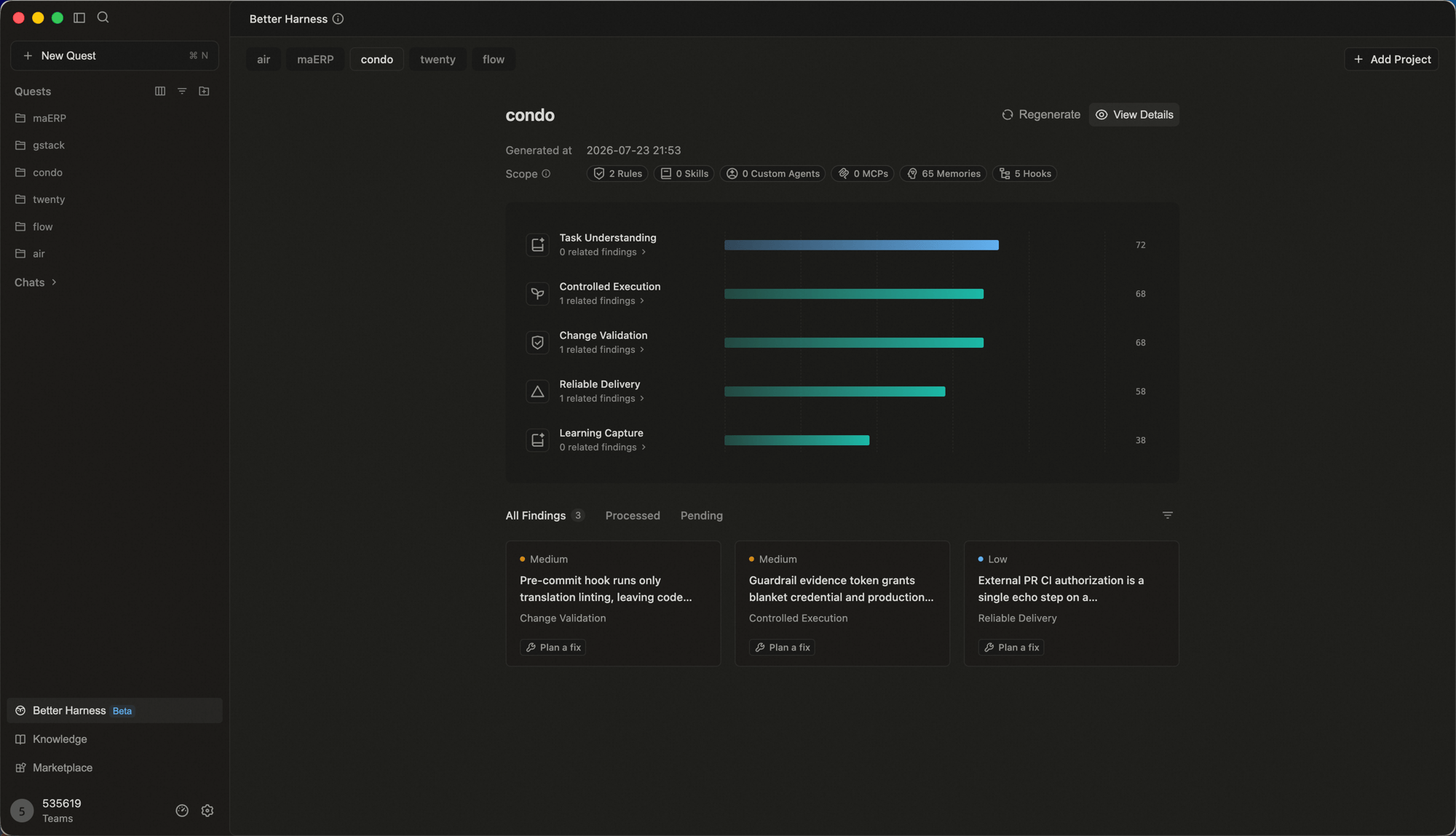
Each dimension is displayed as a bar chart with a numeric score and the number of related findings. The report also shows your project's current Scope overview (Rules, Skills, Custom Agents, MCPs, Memories, Hooks). Every recommendation can be handed to an Agent with **Plan a fix** — a fix task starts in Quest, the Agent proposes a plan, and you review the change like any other Quest task.
## How to use it
1. Click **Better Harness** at the bottom of the left sidebar (next to Knowledge and Marketplace).
2. Your projects appear as tabs at the top (e.g. air, maERP, condo, twenty, flow). Click a tab to switch; click **+ Add Project** to add a new one.
3. The first time you scan a project, you'll see "Understanding your project structure…" as the Agent maps modules, dependencies, and code relationships. You can track progress via **View in Quest List**.
4. When the report is ready, the overview page displays bar chart scores for the five dimensions, related findings counts, and Scope stats (Rules, Skills, Custom Agents, MCPs, Memories, Hooks).
5. Below the chart, finding cards are listed and can be filtered with **All Findings / Processed / Pending** tabs. Each card shows a priority (High/Medium/Low), title, and dimension.
6. Click **Plan a fix** on a card to start the fix flow. Click **Ignore** to dismiss recommendations you don't need.
7. Use **Regenerate** to run a fresh scan, or **View Details** to open the full report page.
 Better Harness doesn't apply fixes on its own. Every fix is a Quest task you can review and roll back — Better Harness only points at what to fix and prepares the prompt.
## Understanding the five dimensions
Checks whether the Agent understands your goal, the relevant context, and the scope of changes — so every task has a clear direction and a clear boundary.
Checks whether the Agent can start and operate the project according to its instructions, and complete the task within clear permissions and operating boundaries.
Checks whether the Agent runs relevant checks for the current change, and whether it can fix failures and validate again.
Checks whether the task result has verifiable evidence for acceptance, and whether high-risk actions have approval, rollback, or recovery options.
Checks whether recurring issues are captured as discoverable, reusable, and maintainable rules, workflows, or tools — and whether their effect is validated in later similar tasks.
## Creating a fix plan
Clicking **Plan a fix** on a card opens a **Finding Detail** dialog containing:
* **Priority** indicator (High / Medium / Low)
* **Issue title** and the dimension it belongs to (e.g. "Repair Plan · Change Validation")
* **Cause** — why the current configuration has this gap
* **Expected Output** — what the fix should achieve
* **Fix Instructions** — an editable prompt pre-filled with a repair plan, starting with `/harness`. You can use it as-is or modify it before confirming.
At the bottom, a model selector and the **Start Fix** button. Clicking it opens a new Quest with the instructions above; track it in your Quest list.
Because fixes flow through Quest, everything the Agent does is inspectable and reversible — no silent edits to your repo.
For every improvement identified, users only need to click **Plan a fix** to have the AI generate and execute the corresponding repair. More importantly, these fixes don't just serve the current task — they can be further distilled into reusable assets like Rules, Skills, and Memories, continuously strengthening your own Agent Harness.
## Viewing the full report
Click **View Details** at the top right of the overview page to open the full report. It includes:
* **Agent Work Loop** — a pipeline visualization showing scores for each of the five dimension nodes.
* **Project Usage** — daily activity heatmap, analyzed session count, estimated active minutes, Skill usage count, and most-used Skills.
* **Prioritized improvements** — all finding cards with **Plan AI Fix** and **View details** actions.
* **Agent Customization** — discovered Loop Engineering assets (Hooks, MCP, Plugins) and coverage status (Rules, Skills, Session Insights, Custom Agents).
* **Evidence & Methods** — sampling confidence, source gaps, and delivery results indicating the data volume behind the conclusions.
* **Long Sessions for Review** — flags sessions exceeding 45 minutes for manual inspection.
* **Session Observations** — representative observations extracted from analyzed sessions to guide investigation priorities.
## Regenerating a report
Reports carry a timestamp (24-hour, local time). As your project evolves, older reports become less relevant. Use **Regenerate** on the report page to run a fresh scan; the newer report replaces the previous one on that project.
Use **Regenerate** when:
* You've merged a batch of Loop Engineering improvements and want to re-check the score.
* The project structure has changed materially (new modules, big refactors).
* The last report is older than a couple of weeks.
## Making every Harness accumulate into future capability
A single `/better-harness` analysis isn't the end. It helps you discover breakpoints, generate fix plans, and verify after fixing whether new Rules, Skills, Hooks, or scripts have truly entered the Agent's work cycle.
More importantly, experiences worth reusing are accumulated as personal or team Agent assets, making subsequent Loops more stable, efficient, and controllable. Now you can enter Better Harness in Qoder, or run `/better-harness`, to see what's most worth strengthening next.
Better Harness doesn't apply fixes on its own. Every fix is a Quest task you can review and roll back — Better Harness only points at what to fix and prepares the prompt.
## Understanding the five dimensions
Checks whether the Agent understands your goal, the relevant context, and the scope of changes — so every task has a clear direction and a clear boundary.
Checks whether the Agent can start and operate the project according to its instructions, and complete the task within clear permissions and operating boundaries.
Checks whether the Agent runs relevant checks for the current change, and whether it can fix failures and validate again.
Checks whether the task result has verifiable evidence for acceptance, and whether high-risk actions have approval, rollback, or recovery options.
Checks whether recurring issues are captured as discoverable, reusable, and maintainable rules, workflows, or tools — and whether their effect is validated in later similar tasks.
## Creating a fix plan
Clicking **Plan a fix** on a card opens a **Finding Detail** dialog containing:
* **Priority** indicator (High / Medium / Low)
* **Issue title** and the dimension it belongs to (e.g. "Repair Plan · Change Validation")
* **Cause** — why the current configuration has this gap
* **Expected Output** — what the fix should achieve
* **Fix Instructions** — an editable prompt pre-filled with a repair plan, starting with `/harness`. You can use it as-is or modify it before confirming.
At the bottom, a model selector and the **Start Fix** button. Clicking it opens a new Quest with the instructions above; track it in your Quest list.
Because fixes flow through Quest, everything the Agent does is inspectable and reversible — no silent edits to your repo.
For every improvement identified, users only need to click **Plan a fix** to have the AI generate and execute the corresponding repair. More importantly, these fixes don't just serve the current task — they can be further distilled into reusable assets like Rules, Skills, and Memories, continuously strengthening your own Agent Harness.
## Viewing the full report
Click **View Details** at the top right of the overview page to open the full report. It includes:
* **Agent Work Loop** — a pipeline visualization showing scores for each of the five dimension nodes.
* **Project Usage** — daily activity heatmap, analyzed session count, estimated active minutes, Skill usage count, and most-used Skills.
* **Prioritized improvements** — all finding cards with **Plan AI Fix** and **View details** actions.
* **Agent Customization** — discovered Loop Engineering assets (Hooks, MCP, Plugins) and coverage status (Rules, Skills, Session Insights, Custom Agents).
* **Evidence & Methods** — sampling confidence, source gaps, and delivery results indicating the data volume behind the conclusions.
* **Long Sessions for Review** — flags sessions exceeding 45 minutes for manual inspection.
* **Session Observations** — representative observations extracted from analyzed sessions to guide investigation priorities.
## Regenerating a report
Reports carry a timestamp (24-hour, local time). As your project evolves, older reports become less relevant. Use **Regenerate** on the report page to run a fresh scan; the newer report replaces the previous one on that project.
Use **Regenerate** when:
* You've merged a batch of Loop Engineering improvements and want to re-check the score.
* The project structure has changed materially (new modules, big refactors).
* The last report is older than a couple of weeks.
## Making every Harness accumulate into future capability
A single `/better-harness` analysis isn't the end. It helps you discover breakpoints, generate fix plans, and verify after fixing whether new Rules, Skills, Hooks, or scripts have truly entered the Agent's work cycle.
More importantly, experiences worth reusing are accumulated as personal or team Agent assets, making subsequent Loops more stable, efficient, and controllable. Now you can enter Better Harness in Qoder, or run `/better-harness`, to see what's most worth strengthening next.