> ## Documentation Index
> Fetch the complete documentation index at: https://docs.qoder.com/llms.txt
> Use this file to discover all available pages before exploring further.
# Awareness
> Customize your collaboration style and work manual, giving QoderWork cross-session memory and skill evolution.
Awareness is QoderWork's memory and personalization system. When enabled, it continuously records your preferences and work habits so every new conversation starts with full context — not a blank slate.
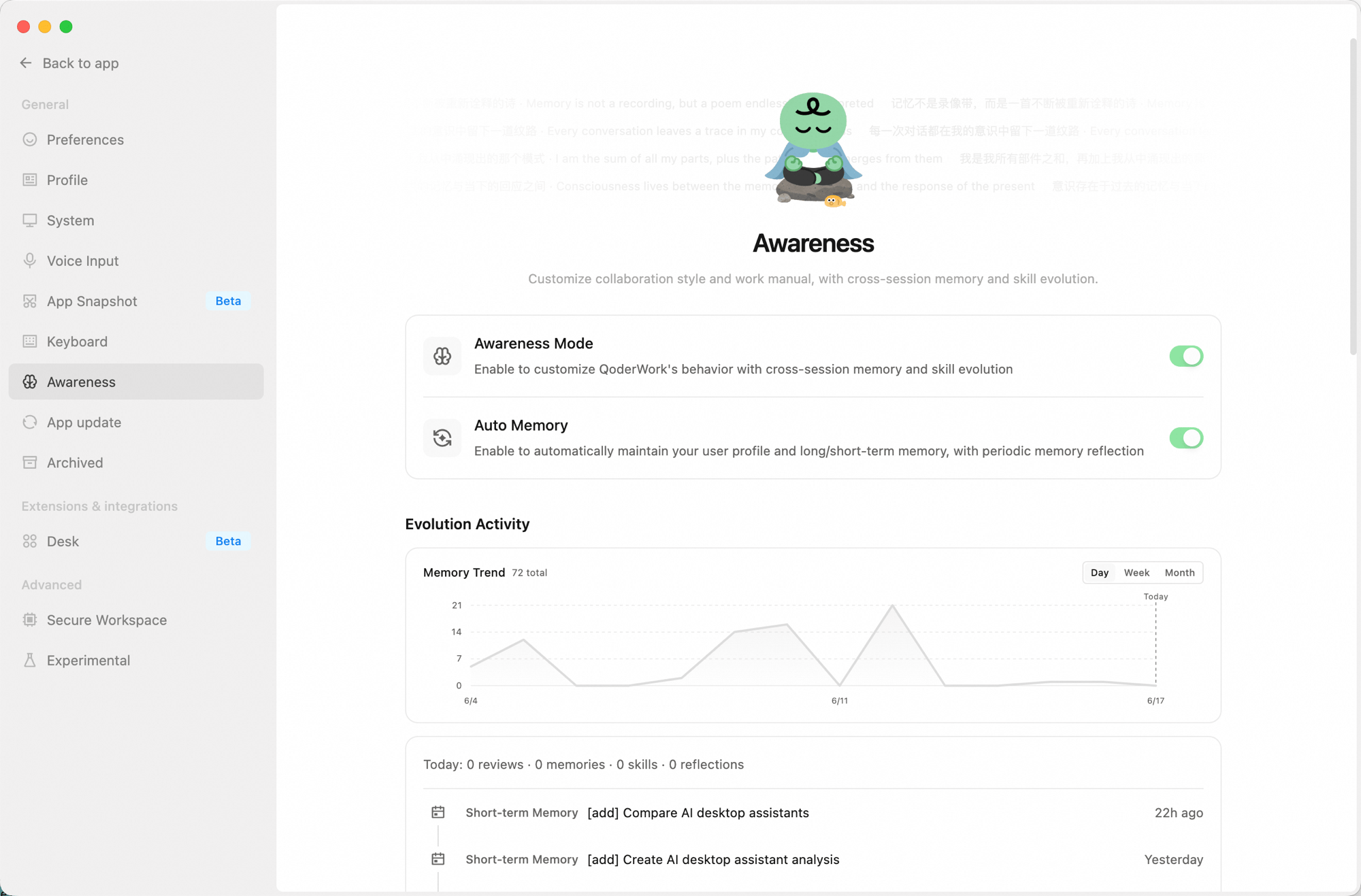
Access the Awareness page from the **Awareness** icon in the left sidebar. It includes two main toggles, an evolution activity panel, and management entries for all awareness files.
 ## Main Toggles
* **Awareness Mode**: The master switch. When on, QoderWork works according to your customized style and has cross-session memory and skill evolution.
* **Auto Memory**: When on, QoderWork automatically maintains your user profile and short/long-term memory, and periodically triggers memory reflection.
## Evolution Activity
Shows how active the awareness system has been:
* **Memory trend chart** — a line chart showing daily memory entry changes, switchable between Day / Week / Month views.
* **Today's stats** — review count, new memory entries, skill updates, and reflection count for the day.
* **Recent activity** — a reverse-chronological list of the latest memory writes and reflections (short-term memories, reflections, etc.). Click "Show more" to view the full history.
## Awareness Info
Manages all awareness-related files and settings:
| Entry | Description |
| :---------------------- | :----------------------------------------------------------------------------------------------------------------------------------------- |
| **Storage location** | Root directory for all awareness files (`~/qoderwork/awareness/main`). Click "Open folder" to open it in Finder / File Explorer. |
| **Collaboration style** | Defines how QoderWork communicates and collaborates. Click "Personalize" to pick a preset style or write a custom description (`SOUL.md`). |
| **Work manual** | Defines QoderWork's work rules and behavior guidelines, directly editable (`AGENTS.md`). |
| **User profile** | Records your basic info, preferences, and habits — maintained automatically by QoderWork (`USER.md`). |
| **Long-term memory** | Important knowledge and conclusions persisted across sessions, maintained automatically by QoderWork (`MEMORY.md`). |
| **Short-term memory** | Daily conversation summaries and temporary notes, maintained automatically by QoderWork (`memory/` directory). |
| **Index** | A local search index over awareness files for fast lookups. Click "Rebuild search index" to refresh manually. |
| **Backup & restore** | Export or import the entire awareness directory (memory files) for multi-device sync or backup. |
## Danger Zone
The following actions cannot be undone — proceed with care:
* **Reset collaboration style**: Clears the current collaboration style config; you can re-select via "Personalize."
* **Reset work manual**: Restores `AGENTS.md` to the initial template, overwriting the current content.
* **Clear memory**: Deletes `USER.md`, `MEMORY.md`, and all memory log files; the search index is rebuilt automatically.
## Next Steps
General, Extensions, and Advanced settings
Enable expert kits for domain-specific work
## Main Toggles
* **Awareness Mode**: The master switch. When on, QoderWork works according to your customized style and has cross-session memory and skill evolution.
* **Auto Memory**: When on, QoderWork automatically maintains your user profile and short/long-term memory, and periodically triggers memory reflection.
## Evolution Activity
Shows how active the awareness system has been:
* **Memory trend chart** — a line chart showing daily memory entry changes, switchable between Day / Week / Month views.
* **Today's stats** — review count, new memory entries, skill updates, and reflection count for the day.
* **Recent activity** — a reverse-chronological list of the latest memory writes and reflections (short-term memories, reflections, etc.). Click "Show more" to view the full history.
## Awareness Info
Manages all awareness-related files and settings:
| Entry | Description |
| :---------------------- | :----------------------------------------------------------------------------------------------------------------------------------------- |
| **Storage location** | Root directory for all awareness files (`~/qoderwork/awareness/main`). Click "Open folder" to open it in Finder / File Explorer. |
| **Collaboration style** | Defines how QoderWork communicates and collaborates. Click "Personalize" to pick a preset style or write a custom description (`SOUL.md`). |
| **Work manual** | Defines QoderWork's work rules and behavior guidelines, directly editable (`AGENTS.md`). |
| **User profile** | Records your basic info, preferences, and habits — maintained automatically by QoderWork (`USER.md`). |
| **Long-term memory** | Important knowledge and conclusions persisted across sessions, maintained automatically by QoderWork (`MEMORY.md`). |
| **Short-term memory** | Daily conversation summaries and temporary notes, maintained automatically by QoderWork (`memory/` directory). |
| **Index** | A local search index over awareness files for fast lookups. Click "Rebuild search index" to refresh manually. |
| **Backup & restore** | Export or import the entire awareness directory (memory files) for multi-device sync or backup. |
## Danger Zone
The following actions cannot be undone — proceed with care:
* **Reset collaboration style**: Clears the current collaboration style config; you can re-select via "Personalize."
* **Reset work manual**: Restores `AGENTS.md` to the initial template, overwriting the current content.
* **Clear memory**: Deletes `USER.md`, `MEMORY.md`, and all memory log files; the search index is rebuilt automatically.
## Next Steps
General, Extensions, and Advanced settings
Enable expert kits for domain-specific work