> ## Documentation Index
> Fetch the complete documentation index at: https://docs.qoder.com/llms.txt
> Use this file to discover all available pages before exploring further.
# Plans & Pricing
> Details on Enterprise plans pricing, seat management, and shared add-on credits.
The Enterprise plans are designed for businesses and teams, providing centralized management, collaboration, and security capabilities, including:
* **Centralized billing**: Organization billing is managed and paid centrally by admins, with support for limiting resource usage quotas.
* **Admin console**: Manage member access permissions, model usage restrictions, data privacy modes, and more.
* **Domain control**: Restrict access to specific email domains.
* **Single Sign-On (SSO)**: Support for enterprise-grade authentication.
* **Analytics & Insights**: Data metrics and analysis.
* **Capability management and distribution**: Plugin/Skill management and sharing.
* **Knowledge engine**: Maximize team knowledge value.
## Plan Comparison
| | Capability | **Teams** | Enterprise |
| --------------------- | ------------------------------------- | ---------- | ------------- |
| Supported products | Qoder Desktop | ✓ | ✓ |
| | QoderWork | ✓ | ✓ |
| | QoderWake | ✓ | ✓ |
| | Qoder JetBrains Plugin | ✓ | ✓ |
| | Qoder CLI | ✓ | ✓ |
| | Cloud Agents | ✓ | ✓ |
| | Qoder Mobile | ✓ | ✓ |
| Identity & access | SSO (SAML/OIDC) | ✓ | ✓ |
| | Role management | ✓ | ✓ |
| | Groups | | ✓ |
| Centralized billing | Resource quota management | ✓ | ✓ |
| | Shared Add-on Credits pooling | ✓ | ✓ |
| | Group-based billing | | ✓ |
| Knowledge engine | RepoWiki / Knowledge Cards | ✓ | ✓ |
| | Personal knowledge base cloud storage | 10G | 15G |
| AI extensibility | Plugin/Skill sharing | ✓ | ✓ |
| | Plugin/Skill centralized distribution | | ✓ |
| | Plugin Marketplace | | ✓ |
| AI governance | Model routing policy control | | ✓ |
| | Content security policy | | ✓ |
| Analytics | Resource usage statistics | ✓ | ✓ |
| | AI coding metrics | ✓ | ✓ |
| Security & compliance | Privacy mode management | ✓ | ✓ |
| | Audit log | | ✓ |
| Openness | OpenAPI | Basic APIs | Extended APIs |
Teams and Enterprise plans are independently isolated and do not support smooth upgrade/downgrade between each other. Please choose based on your team size and requirements.
## Subscription Pricing & Seat Quotas
The Enterprise plans are priced per seat, with support for purchasing Shared Add-on Credits for organization-wide consumption.
| | Seat pricing |
| ---------- | --------------------------------------------------------------------------------------------------------------------------------------------------------------------------------------------------------------------------------------------------------------------------------------------------------------------------------------------------------------------------------------------------------------------------------------------- |
| Teams | **\$40 / seat / month**
Each seat includes a fixed AI compute quota (Credits): - **3,000 Credits per month**: Each seat includes a fixed monthly quota of 3,000 Credits for accessing advanced models.
- **Monthly reset & non-transferable**: Seat Credits are only valid for the current monthly cycle. Unused Credits reset to zero at the end of the cycle and cannot be transferred or shared among members.
|
| Enterprise | **\$20 / seat / month**
**Each seat does not include any AI compute quota** (Credits).
Credits are billed separately via Shared Add-on Credits. |
### Seat Management
Users assigned a billable role will occupy a seat. Once occupied, the seat is billed for the entire current billing cycle, even if the user's role is subsequently downgraded or they are removed from the organization. See [Members and Roles](/account/teams/members-and-roles) for role definitions.
Enterprise plan subscriptions support adjusting seat counts at any time, with bills calculated immediately:
* For organizations that purchased on the official website, admins can go to the **Members** page **> Adjust seat count** to adjust the number of seats as needed.
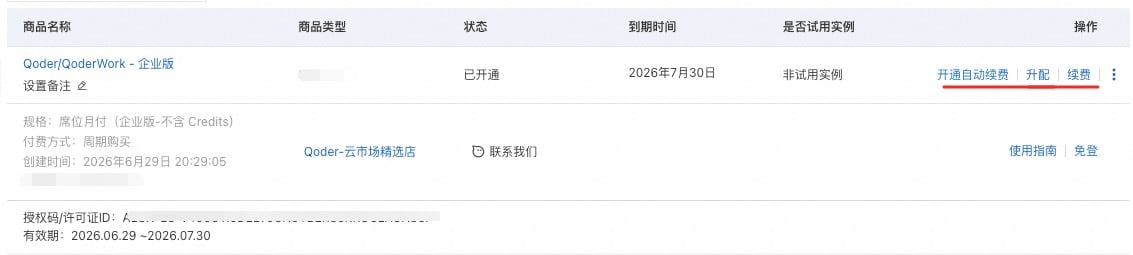
* For organizations that purchased through the cloud marketplace, use the purchasing Alibaba Cloud account to go to the corresponding **Service Details** **> Upgrade/Downgrade** in the cloud marketplace to adjust seats as needed.
 When adding a new seat, charges are applied on a **prorated basis** for the remainder of the current billing cycle. For Teams plans, the included 3,000 Credits for the new seat are also prorated accordingly.
### Subscription Renewal
* For organizations that purchased on the official website, admins can go to **Subscription & Billing** **> Enable auto-renewal.** Once enabled, the default payment method will be charged automatically at the end of each cycle.
* For organizations that purchased through the cloud marketplace, only Enterprise plans support auto-renewal. Use the purchasing Alibaba Cloud account to go to the corresponding **Service Details** **> Enable auto-renewal** in the cloud marketplace. Once enabled, the payment method configured in the Alibaba Cloud account will be charged automatically at the end of each cycle. See [Auto-renewal](https://help.aliyun.com/zh/marketplace/user-guide/user-automatic-renewal) for details.
Purchased but **unassigned** seats can be reduced at any time during the current billing cycle. The price difference is refunded on a prorated basis.
Teams plan:
The refund for reduced seats is credited to the organization's balance and automatically applied to future invoices. The balance can only be used within the Qoder platform — it is non-transferable, cannot be exchanged for cash, and does not accrue interest.
Enterprise plan:
When downgrading through the cloud marketplace, fees are settled based on the remaining time in the cycle and refunded to the original payment method.
## Shared Add-on Credits
Administrators can purchase **Shared Add-on Credits** to supplement model compute capacity. These credits form a shared pool available to all organization members.
| Feature | Details |
| :----------- | :-------------------------------------------------------------- |
| **Pricing** | \$40 USD for 2,000 Credits (one-time purchase, stackable). |
| **Validity** | Valid for **3 months** from the date of purchase or redemption. |
| **Refunds** | Non-refundable and non-transferable. |
Administrators can purchase credits by navigating to **Organization Settings > Organization Usage > Shared Add-on Credits**.
Purchases made through a cloud marketplace can be redeemed using a redemption code. See [About Redemption Codes](/account/teams/about-redeem).
When a member generates a request, Credits are deducted in the following order:
1. The monthly **seat quota**
2. Any **personal add-on Credits** purchased by the user
3. The organization's **Shared Add-on Credits**
*Note: If multiple packs of the same type exist, the one expiring first is consumed first.*
Administrators can set a maximum shared credit usage limit per member under **Organization Settings > Members** to manage resource consumption.
For complete details, see the [Shared Add-on Credits guide](/account/teams/shared-add-on-credits).
## Billing & Payment Management
Enterprise plans support centralized billing.
For organizations that purchased on the official website:
* **Order management**: Navigate to **Organization Settings > Subscription & Billing > Orders** to review past orders, pay outstanding invoices, or cancel pending orders.
* **Payment methods**: Manage credit cards, set a default payment method, and update billing addresses under **Organization Settings > Subscription & Billing > Manage Payment Information**. *Note: Updates apply to future transactions only.*
For organizations that purchased through the cloud marketplace:
* Billing and payment methods are managed within the Alibaba Cloud marketplace account. Please **go to Alibaba Cloud Marketplace** to manage.
When adding a new seat, charges are applied on a **prorated basis** for the remainder of the current billing cycle. For Teams plans, the included 3,000 Credits for the new seat are also prorated accordingly.
### Subscription Renewal
* For organizations that purchased on the official website, admins can go to **Subscription & Billing** **> Enable auto-renewal.** Once enabled, the default payment method will be charged automatically at the end of each cycle.
* For organizations that purchased through the cloud marketplace, only Enterprise plans support auto-renewal. Use the purchasing Alibaba Cloud account to go to the corresponding **Service Details** **> Enable auto-renewal** in the cloud marketplace. Once enabled, the payment method configured in the Alibaba Cloud account will be charged automatically at the end of each cycle. See [Auto-renewal](https://help.aliyun.com/zh/marketplace/user-guide/user-automatic-renewal) for details.
Purchased but **unassigned** seats can be reduced at any time during the current billing cycle. The price difference is refunded on a prorated basis.
Teams plan:
The refund for reduced seats is credited to the organization's balance and automatically applied to future invoices. The balance can only be used within the Qoder platform — it is non-transferable, cannot be exchanged for cash, and does not accrue interest.
Enterprise plan:
When downgrading through the cloud marketplace, fees are settled based on the remaining time in the cycle and refunded to the original payment method.
## Shared Add-on Credits
Administrators can purchase **Shared Add-on Credits** to supplement model compute capacity. These credits form a shared pool available to all organization members.
| Feature | Details |
| :----------- | :-------------------------------------------------------------- |
| **Pricing** | \$40 USD for 2,000 Credits (one-time purchase, stackable). |
| **Validity** | Valid for **3 months** from the date of purchase or redemption. |
| **Refunds** | Non-refundable and non-transferable. |
Administrators can purchase credits by navigating to **Organization Settings > Organization Usage > Shared Add-on Credits**.
Purchases made through a cloud marketplace can be redeemed using a redemption code. See [About Redemption Codes](/account/teams/about-redeem).
When a member generates a request, Credits are deducted in the following order:
1. The monthly **seat quota**
2. Any **personal add-on Credits** purchased by the user
3. The organization's **Shared Add-on Credits**
*Note: If multiple packs of the same type exist, the one expiring first is consumed first.*
Administrators can set a maximum shared credit usage limit per member under **Organization Settings > Members** to manage resource consumption.
For complete details, see the [Shared Add-on Credits guide](/account/teams/shared-add-on-credits).
## Billing & Payment Management
Enterprise plans support centralized billing.
For organizations that purchased on the official website:
* **Order management**: Navigate to **Organization Settings > Subscription & Billing > Orders** to review past orders, pay outstanding invoices, or cancel pending orders.
* **Payment methods**: Manage credit cards, set a default payment method, and update billing addresses under **Organization Settings > Subscription & Billing > Manage Payment Information**. *Note: Updates apply to future transactions only.*
For organizations that purchased through the cloud marketplace:
* Billing and payment methods are managed within the Alibaba Cloud marketplace account. Please **go to Alibaba Cloud Marketplace** to manage.